What is AWS SCP (Service Control Policy) and How does it Help with Permissions?
AWS Organizations provides centralised governance and management of multiple accounts. You can use Service Control Policies (SCPs) with AWS Organizations to establish controls that all IAM principals (users and roles) adhere to. This makes it easier for you to fine-tune your strategy to meet the exact needs of your company or team rules.

In this post, we will look at what SCPs are, elements of them and walk through some simple examples, and what the difference is between SCPs and Identity Access Management (IAM) policies.
What is AWS service control policy (AWS SCP)?
You create and apply SCPs through AWS Organizations. Using SCP, you can limit the AWS services, resources, and individual API operations that users and roles in each member account can access. They can be attached to organizational units(OUs) or member accounts.
Here is a simple example:
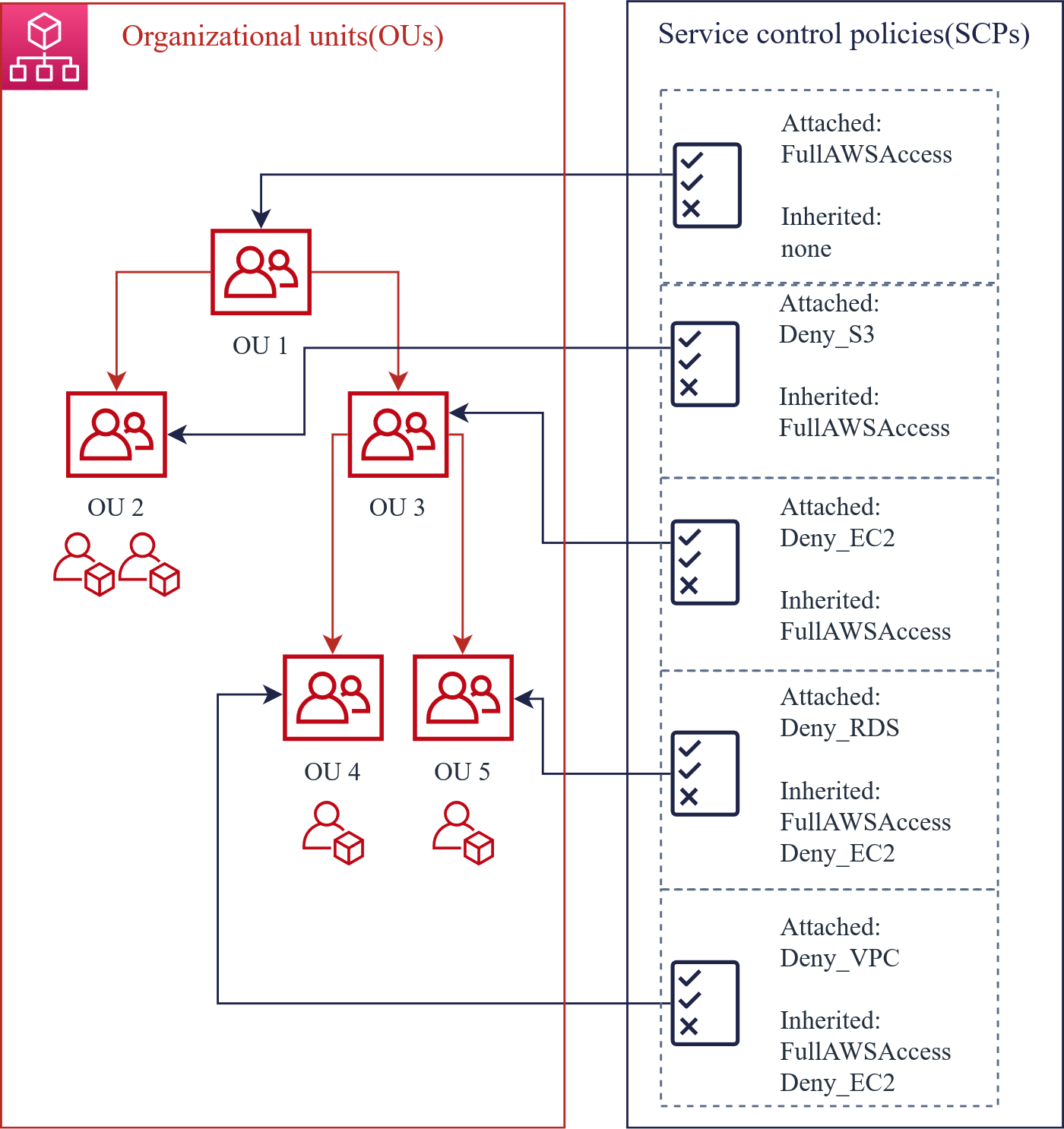
If SCP denies an action on an account, no entity in the account can perform that action, even if its IAM permissions allow it.
- The member accounts of an AWS Organization are unable to see the SCPs that have been applied to them. This means there will be no indication in the error message from an API call or in the CloudTrail log to show what denied the call.
- SCPs don't affect users or roles in the management account. They affect only the
Evaluation of actions in AWS
An action performed by an IAM User/Role is allowed if all the following conditions are satisfied:
- The action is allowed with an IAM permission policy.
- The action is allowed by the IAM permission boundary.
- The action is allowed by the SCP.
SCP allow or denial list
You configure SCPs in your organization to use an allow or deny list.
The deny list is set as the default option and you specify which services and actions are prohibited to accounts. When you set AWS SCPs for the first time, it includes a FullAWSAccess policy which simply allows every action against any resource.
{
"Version": "2012-10-17",
"Statement": [
{
"Effect": "Allow",
"Action": "",
"Resource": ""
}
]
}
You then add policies to deny certain actions against your resources.
Or if you choose to, you can replace the FullAWSAccess policy with your own allow list. This is only possible by first attaching a new allow policy and detaching the FullAWSAccess policy. Actions are then denied by default and you only create the allow policies that specify the services and actions that are allowed.
AWS SCP examples and implementation
Elements of SCP**
Service Control Policy (SCP) policy syntax is similar to the IAM permission policy and is written in JSON. Below is an example of a policy that denies the creation of any other EC2 instance type except t2.micro.

- Statement: Serves as the container for policy elements. You can have multiple statements in SCPs.
- Statement ID (Sid): Provides a friendly name for the statement, and it’s optional.
- Effect: Defines whether the SCP statement allows or denies access to the IAM users and roles in an account.
- Action: Specifies AWS service and actions.
- NotAction: Specifies AWS service and actions that are exempt from the SCP.
- Resource: Specifies the AWS resources that the SCP applies to.
- SCP Condition: Specifies conditions for when the statement is in effect.
SCP implementation
To simply implement SCPs, you can use the policy editor in the AWS Organizations console. This editor makes it easier to author SCPs by guiding you to add actions, resources, and conditions.

AWS SCP examples
There is no special mode for SCPs or alternative way to test whether an SCP is going to do what you intended. Therefore, be aware that creating SCPs can block accounts from using AWS services and their functions.
1. Deny account from leaving the organization: When the account leaves an organization, it is no longer bound by the controls established within that organization.
This SCP can be used to prevent someone from moving an account to a different organization that has a set of different controls that are not as restrictive, and there is, therefore a risk of someone making undesired changes.
{
"Version": "2012-10-17",
"Statement": [
{
"Effect": "Deny",
"Action": [
"organizations:LeaveOrganization"
],
"Resource": "*"
}
]
}
2. Deny access to specific regions: AWS has 26 regions at this moment, though customers typically operate their workloads within one to four regions. This SCP gives you the ability to limit the regions used by accounts.
Change "Sid" and "aws:RequestedRegion" to what you want to use.
{
"Version": "2012-10-17",
"Statement": [
{
"Sid": "DenyAllOutsideEU",
"Effect": "Deny",
"NotAction": [
"a4b:",
"acm:",
"aws-marketplace-management:",
"aws-marketplace:",
"aws-portal:",
"budgets:",
"ce:",
"chime:",
"cloudfront:",
"config:",
"cur:",
"directconnect:",
"ec2:DescribeRegions",
"ec2:DescribeTransitGateways",
"ec2:DescribeVpnGateways",
"fms:",
"globalaccelerator:",
"health:",
"iam:",
"importexport:",
"kms:",
"mobileanalytics:",
"networkmanager:",
"organizations:",
"pricing:",
"route53:",
"route53domains:",
"s3:GetAccountPublic*",
"s3:ListAllMyBuckets",
"s3:PutAccountPublic*",
"shield:",
"sts:",
"support:",
"trustedadvisor:",
"waf-regional:",
"waf:",
"wafv2:",
"wellarchitected:"
],
"Resource": "",
"Condition": {
"StringNotEquals": {
"aws:RequestedRegion": [
"eu-central-1",
"eu-west-1"
]
},
"ArnNotLike": {
"aws:PrincipalARN": [
"arn:aws:iam:::role/Role1AllowedToBypassThisSCP",
"arn:aws:iam::*:role/Role2AllowedToBypassThisSCP"
]
}
}
}
]
}
3. Require Amazon EC2 instances to use a specific type: With this SCP, any instance launches which do not use the t2.micro instance type are denied.
{
"Version": "2012-10-17",
"Statement": [
{
"Sid": "RequireMicroInstanceType",
"Effect": "Deny",
"Action": "ec2:RunInstances",
"Resource": [
"arn:aws:ec2:::instance/*"
],
"Condition": {
"StringNotEquals": {
"ec2:InstanceType": "t2.micro"
}
}
}
]
}
4. Require MFA to perform an API action
Use an SCP like the following to require that multi-factor authentication (MFA) is enabled before an IAM user or role can perform an action. In this example, the action is to stop an Amazon EC2 instance.
{
"Version": "2012-10-17",
"Statement": [
{
"Sid": "DenyStopAndTerminateWhenMFAIsNotPresent",
"Effect": "Deny",
"Action": [
"ec2:StopInstances",
"ec2:TerminateInstances"
],
"Resource": "*",
"Condition": {"BoolIfExists": {"aws:MultiFactorAuthPresent": false}}
}
]
}
5. The following SCP blocks S3 Block Public Access and denies S3 buckets from being made public.
{
"Version": "2012-10-17",
"Statement": [
{
"Effect": "Deny",
"Action": [
"s3:PutAccountPublicAccessBlock"
],
"Resource": [
"*"
]
}
]
}
6. More official AWS SCP examples.
Need help with a specific SCP? Contact us and our team of certified AWS consultants can help you with the creation of SCPs in your account.
AWS Organizations SCP best practices
- SCPs cannot restrict the management account of the organization. So do not use a management account for anything other than setting up organizations.
- It’s strongly recommended that you do not attach SCPs to the root of your organization without thoroughly testing the impact that the policy has on AWS accounts. Instead, create an OU that you can move your accounts into one at a time, or at least in small numbers, to ensure that you don't inadvertently lock users out of key services.
- SCPs should be primarily applied at the OU (organization unit) level, to ease troubleshooting, instead of at the account level.
SCP best practice use cases
- Deny root user access: prevent takeover attacks using the root user account.
- Enforce MFA: require MFA enabled for specific actions.
- Protect monitoring, auditing, and security tools: prevent users from disabling or modifying AWS CloudWatch, Config, GuardDuty, and CloudTrail.
- Restrict regions: restrict regions allowed in your organization for geographical proximity or regulatory needs.
- Restrict EC2 AMI sharing and visibility: prevent AMIs from being public or shared with other AWS accounts.
AWS Organizations SCP vs IAM policy
SCPs use the AWS Identity and Access Management (IAM) policy language; however, they do not grant permissions. SCPs specify the maximum permissions for an organization, organizational unit (OU), or AWS account. When you attach an SCP to your organization root or an OU, the SCP limits permissions for entities in member accounts.
IAM Policies can grant/deny certain actions to certain resources and you can use IAM Policies alone, but you can't use SCPs without IAM policies.
AWS Organizations SCPs
You can use SCPs to allow or deny access to AWS services for individual AWS accounts with AWS Organizations member accounts, or for groups of accounts within an organizational unit (OU). The specified actions from an attached SCP affect all IAM identities including the root user of the member account.
AWS services that aren't explicitly allowed by the SCPs associated with an AWS account or its parent OUs are denied. SCPs associated with an OU are inherited by all AWS accounts in that OU.
IAM policies
IAM policies allow or deny access to AWS services or API actions that work with IAM. An IAM policy can be applied only to IAM identities (users, groups, or roles). IAM policies cannot restrict the AWS account root user.

For more information on how you can use IAM to secure access to your organization, see AWS Identity and Access Management and AWS Organizations.
Conclusion
SCPs are very effective at enforcing policies and restricting allowed operations. An SCP applied to the organizational root might be too generic and ineffective, but by categorising it clearly into an organizational unit (OU) with well-defined boundaries, you can introduce severe restrictions and mitigate potential vulnerabilities.

An AWS Solutions Architect with over 5 years of experience in designing, assessing, and optimizing AWS cloud architectures. At Stormit, he supports customers across the full cloud lifecycle — from pre-sales consulting and solution design to AWS funding programs such as AWS Activate, Proof of Concept (PoC), and the Migration Acceleration Program (MAP).