Amazon Aurora vs. Amazon RDS: Differences, Pricing & How to Choose the Right Database
The right choice between Amazon Aurora and Amazon RDS depends on what your workload needs today and how you expect it to grow. An Amazon Aurora vs. Amazon RDS comparison quickly comes down to architecture. Aurora offers shared distributed storage, elastic scaling, and Aurora-specific global capabilities, while Amazon RDS is often simpler and more cost-effective for conventional relational workloads. This guide compares architecture, performance, scalability, availability, and pricing to help you choose.
Quick summary
- Amazon RDS usually fits predictable workloads where engine choice, simplicity, and cost control matter most.
- Amazon Aurora becomes valuable when shared-storage read scaling, automatic storage growth, elastic compute, or multi-Region capabilities solve a real problem.
- Amazon Aurora vs. Amazon RDS pricing depends on the whole architecture: compute, storage, I/O, replicas, availability, backups, and data transfer.
- Base the decision on measured demand, recovery targets, compatibility, expected growth, and total cost. If Amazon RDS meets those requirements, Aurora's extra complexity may not be justified.
Amazon RDS vs. Amazon Aurora: start with one important distinction
Amazon Aurora and Amazon Relational Database Service (Amazon RDS) are often discussed as separate competing services, but Aurora is actually part of Amazon RDS.
Amazon RDS is AWS's managed relational database service. Aurora is an AWS-built relational database engine compatible with MySQL and PostgreSQL. You can find the current engine and deployment options in the Amazon RDS documentation.
The practical difference between Amazon Aurora and Amazon RDS comes down to architecture. Aurora uses distributed, shared storage, while conventional engines managed through Amazon RDS use a different storage and replication model. The right choice depends on which approach better fits the workload requirements.
If you are still deciding whether to use a managed database at all, see our Amazon RDS vs. EC2 comparison.
Amazon Aurora vs. Amazon RDS at a glance
| Comparison point | Amazon RDS | Amazon Aurora |
| Best suited to | Predictable, conventional workloads | High-throughput, growing, or variable workloads |
| Engines | MySQL, PostgreSQL, MariaDB, Oracle, SQL Server, Db2 | MySQL-compatible, PostgreSQL-compatible |
| Architecture | DB instance or Multi-AZ DB cluster with provisioned storage | Compute separated from shared distributed storage |
| Performance | Depends on engine, instance class, storage, and workload | Designed for high-throughput MySQL- and PostgreSQL-compatible workloads; actual performance depends on the workload |
| Storage | Provisioned; Storage Autoscaling available | Grows automatically with data |
| Read scaling | Up to 15 read replicas for MySQL/PostgreSQL; two readable standbys in Multi-AZ DB clusters | Up to 15 Aurora Replicas sharing the cluster volume; reader Auto Scaling |
| Replication | Depends on engine and deployment; read replicas maintain separate database copies | Aurora Replicas share the cluster volume |
| Availability | Single-AZ, Multi-AZ DB instance, or Multi-AZ DB cluster | Storage spans three AZs; replicas can provide compute failover |
| Serverless | No equivalent for conventional engines | Aurora Serverless |
| Multi-Region | Options vary by engine | Aurora Global Database |
| Pricing | Compute, provisioned storage, I/O or throughput, replicas, backups, data transfer, and licensing where applicable | Compute or ACUs, consumed storage, I/O model, replicas, backups, Global Database, and data transfer |
| Operational complexity | Usually simpler | More cluster-specific choices |
What is Amazon RDS?
Amazon RDS runs managed relational databases without requiring you to manage the underlying operating system or infrastructure. AWS handles backups, software patching, failure detection, and recovery.
You still choose the engine, instance class, storage, Region, and availability model. A traditional Multi-AZ DB instance maintains a synchronous standby in another Availability Zone. For MySQL and PostgreSQL, a Multi-AZ DB cluster uses one writer and two readable standbys across three AZs.
One clear advantage of Amazon RDS is engine choice. If you need MariaDB, Oracle, SQL Server, or Db2, standard Amazon RDS is the relevant choice. It also fits MySQL and PostgreSQL workloads that do not need Aurora-specific capabilities.
What is Amazon Aurora?
Amazon Aurora is a MySQL- and PostgreSQL-compatible relational database engine designed by AWS.
The important difference is how Aurora separates compute from storage. Writer and reader instances access the same logical cluster volume, while the data itself is distributed across three Availability Zones. That makes the choice between Amazon Aurora and Amazon RDS primarily an architectural one.
Amazon Aurora vs. Amazon RDS: key differences that affect your architecture
Architecture, storage, and replication
Standard Amazon RDS uses DB instances with provisioned storage. Depending on the engine and deployment, you can use Single-AZ, a Multi-AZ DB instance, a Multi-AZ DB cluster, or read replicas.
Aurora separates compute from a distributed cluster volume. It maintains six copies of the data across three Availability Zones, while writer and reader instances access the same shared storage.
Aurora storage scales automatically with your data and capacity limits vary by engine and version. Standard RDS storage is provisioned and can grow through Storage Autoscaling, with limits depending on the engine and configuration.
The shared-storage model also changes replication. Traditional RDS read replicas maintain their own database copies. Aurora Replicas use the existing cluster volume, which helps keep replica lag low and simplifies read scaling.
Performance and scaling
Performance in an Amazon Aurora vs. Amazon RDS comparison depends heavily on the workload. Indexes, query design, connections, memory, write patterns, and I/O can matter more than the engine. A lightly used internal app may see little benefit from Aurora, while a high-concurrency one may see a much greater impact.
Both services support vertical scaling and read replicas. For MySQL and PostgreSQL, RDS Multi-AZ DB clusters provide two readable standbys.
Aurora supports up to 15 Replicas sharing the cluster volume, while reader Auto Scaling adjusts replica count as demand changes. Aurora Serverless scales compute in Aurora Capacity Units.
Example: a SaaS platform with large swings in read traffic may benefit from Aurora readers and Auto Scaling, while an internal CRM with stable traffic may run more economically on RDS for PostgreSQL.
Availability and failover
Both Amazon RDS and Aurora can provide strong availability. A traditional RDS Multi-AZ DB instance uses a synchronous standby that does not serve reads. AWS states that failovers typically take 60–120 seconds.
An RDS Multi-AZ DB cluster for MySQL or PostgreSQL uses one writer and two readable standbys across three AZs, with failovers typically under 35 seconds.
Aurora stores six copies of data across three AZs regardless of the number of DB instances. With an eligible Aurora Replica available, service is typically restored in under 60 seconds and often under 30 seconds.
Fast failover therefore does not automatically mean Aurora. Compare the actual deployment models against your RTO.
For a broader look at Multi-AZ design, redundancy, and failover patterns, see our guide to AWS high availability architecture.
Supported engines and operational complexity
Standard Amazon RDS supports Db2, MariaDB, MySQL, Oracle, PostgreSQL, and SQL Server. Aurora supports MySQL and PostgreSQL compatibility.
For MySQL and PostgreSQL migrations, test extensions, parameters, engine behavior, and tooling. Compatibility does not mean every implementation detail is identical.
Aurora also introduces cluster endpoints, Serverless capacity, failover priorities, and Global Database. These capabilities are useful when needed, but add architectural choices your team must understand.
Architecture explained: why Aurora behaves differently
Architecture matters because it directly affects replication, scaling, and what happens when an instance fails.
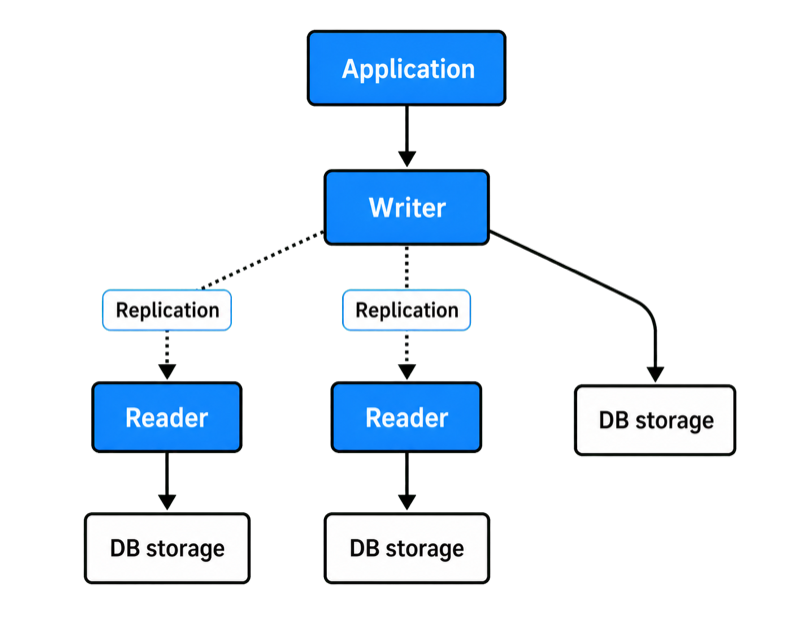
In an Amazon RDS Multi-AZ DB cluster, one writer and two readable instances run across separate Availability Zones. Changes are replicated from the writer using semisynchronous replication, and the readers can also act as failover targets.
Aurora instead separates compute from storage. The writer and Aurora Replicas run as separate compute instances but access the same logical cluster volume. Aurora replicates the data across six storage nodes in three Availability Zones, independently of the number of database instances in the cluster.
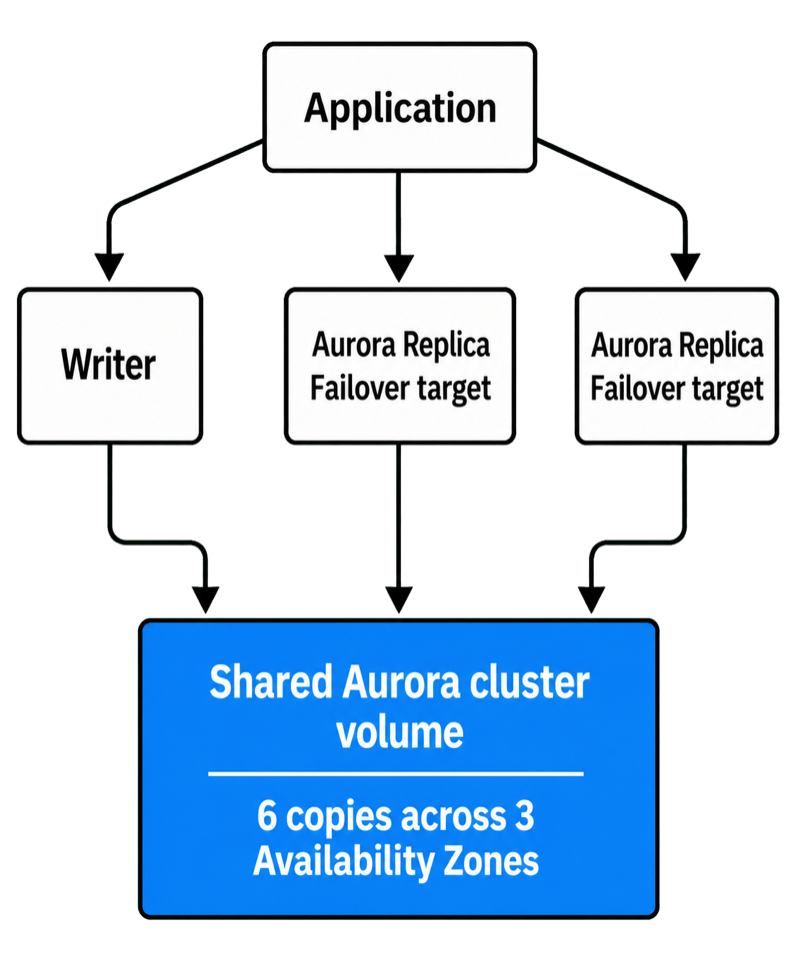
This shared-storage architecture changes replication and failover. Aurora Replicas do not maintain another complete database copy at the compute layer. If the writer fails, an eligible replica can be promoted while continuing to use the cluster volume.
In practice, that means less replication work at the compute layer, low-lag readers, and a simpler path to adding read capacity or promoting a replica. These advantages matter most as read concurrency and availability requirements increase; smaller, predictable workloads may see little benefit.
Amazon Aurora vs. Amazon RDS pricing: compare equivalent architectures
A useful Amazon Aurora vs. Amazon RDS pricing comparison has to go beyond hourly instance prices. The cheaper instance does not necessarily produce the cheaper production architecture.
Amazon RDS costs can include compute, provisioned storage, IOPS or throughput, Multi-AZ resources, replicas, backups, data transfer, and commercial database licensing.
Aurora costs can include provisioned compute or Serverless capacity, consumed storage, replicas, I/O, backups, Global Database, and data transfer.
For a deeper breakdown, see our guide to Amazon RDS pricing.
Aurora Standard vs. I/O-Optimized
With Aurora Standard, you pay for compute, storage, and read/write I/O requests. The exact rates vary by Region and configuration.
Aurora I/O-Optimized does not charge separately for read and write I/O, but compute and storage are priced higher. AWS says it can reduce costs when I/O represents more than 25% of total Aurora database spend. See the current Amazon Aurora pricing for Region-specific rates.
Example: a transaction-heavy application generating large volumes of storage I/O may be cheaper on I/O-Optimized despite its higher compute price.
Aurora Serverless changes the calculation
Aurora Serverless scales compute in Aurora Capacity Units and, on supported versions and configurations, can scale down to zero.
It can work well for development databases, intermittent applications, or highly variable workloads. A continuously busy database may be more predictable on provisioned capacity.
If you are already running Amazon RDS and looking for ways to reduce spend, see our guide to Amazon RDS cost optimization.
Compare the same outcome
If an application needs one modest Single-AZ MySQL instance, Amazon RDS will often have the simpler cost structure.
To compare Amazon Aurora vs. Amazon RDS pricing fairly, make sure both architectures meet the same availability, scaling, and performance requirements. For example, if the workload needs readable instances across multiple AZs, compare Aurora with replicas against an RDS Multi-AZ DB cluster, rather than a single RDS instance.
If you want to compare the expected costs of Amazon RDS and Aurora for your workload, Stormit can help assess the relevant usage, scaling, and availability requirements before you choose an architecture.
When should you choose Amazon RDS?
Amazon RDS often makes more sense when simplicity, compatibility, and predictable costs matter most.
Choose it when:
- the workload is stable and easy to size;
- you need MariaDB, Oracle, SQL Server, or Db2;
- engine-specific compatibility is important;
- Multi-AZ, Storage Autoscaling, and conventional read replicas meet the requirement;
- Aurora's additional capabilities would not solve a current workload requirement.
Example: a PostgreSQL business application with predictable daytime traffic, modest growth, and limited read scaling may be simpler and cheaper on Amazon RDS.
When should you choose Amazon Aurora?
Aurora makes more sense when its architecture solves a measurable problem in the workload.
Choose it when you need:
- large-scale read scaling with shared storage;
- automatic storage growth;
- highly variable compute through Aurora Serverless;
- I/O economics that favor Aurora I/O-Optimized;
- Aurora Global Database for multi-Region reads or disaster recovery.
Example: an e-commerce platform with heavy read traffic, seasonal peaks, and unpredictable growth may benefit from Aurora readers, automatic storage expansion, and Serverless or reader Auto Scaling.
Common mistakes when choosing Amazon Aurora or Amazon RDS
- Choosing Aurora because it has more features. If standard RDS meets the workload requirements, extra capability can simply add cost and complexity.
- Comparing Aurora with a Single-AZ RDS instance. Compare architectures with equivalent availability and scaling.
- Assuming Aurora always fails over faster. RDS Multi-AZ DB clusters can also provide fast automatic failover.
- Assuming Aurora Serverless is always cheaper. It saves money only when elasticity prevents meaningful overprovisioning.
- Skipping compatibility testing. Test SQL behavior, extensions, parameters, tooling, and migration before production.
- Designing for scale too early. Size for realistic growth and keep a migration path instead of paying now for capacity you may never use.
When to use Amazon Aurora vs. Amazon RDS: a practical decision framework
In practice, the choice becomes clearer once both options are compared against the same availability, scaling, and cost requirements. If you are deciding when to use Amazon Aurora vs. Amazon RDS, start with engine compatibility.
For a broader way to evaluate these trade-offs, see our guide to the AWS Well-Architected Framework, which covers reliability, performance efficiency, cost optimization, and operational excellence.
| Requirement | Usually favors |
| Predictable small or moderate workload | Amazon RDS |
| Broad engine choice | Amazon RDS |
| Maximum compatibility | Amazon RDS |
| MySQL/PostgreSQL with readable Multi-AZ standbys | RDS Multi-AZ DB cluster or Aurora |
| Fast automatic failover | RDS Multi-AZ DB cluster or Aurora |
| Rapid or unpredictable storage growth | Aurora |
| Large-scale read scaling with shared storage | Aurora |
| Highly variable compute | Aurora Serverless |
| Heavy I/O with suitable economics | Aurora I/O-Optimized |
| Aurora-specific multi-Region architecture | Aurora Global Database |
The table shows which option each requirement tends to favor. The decision tree brings those factors together into a practical starting point.
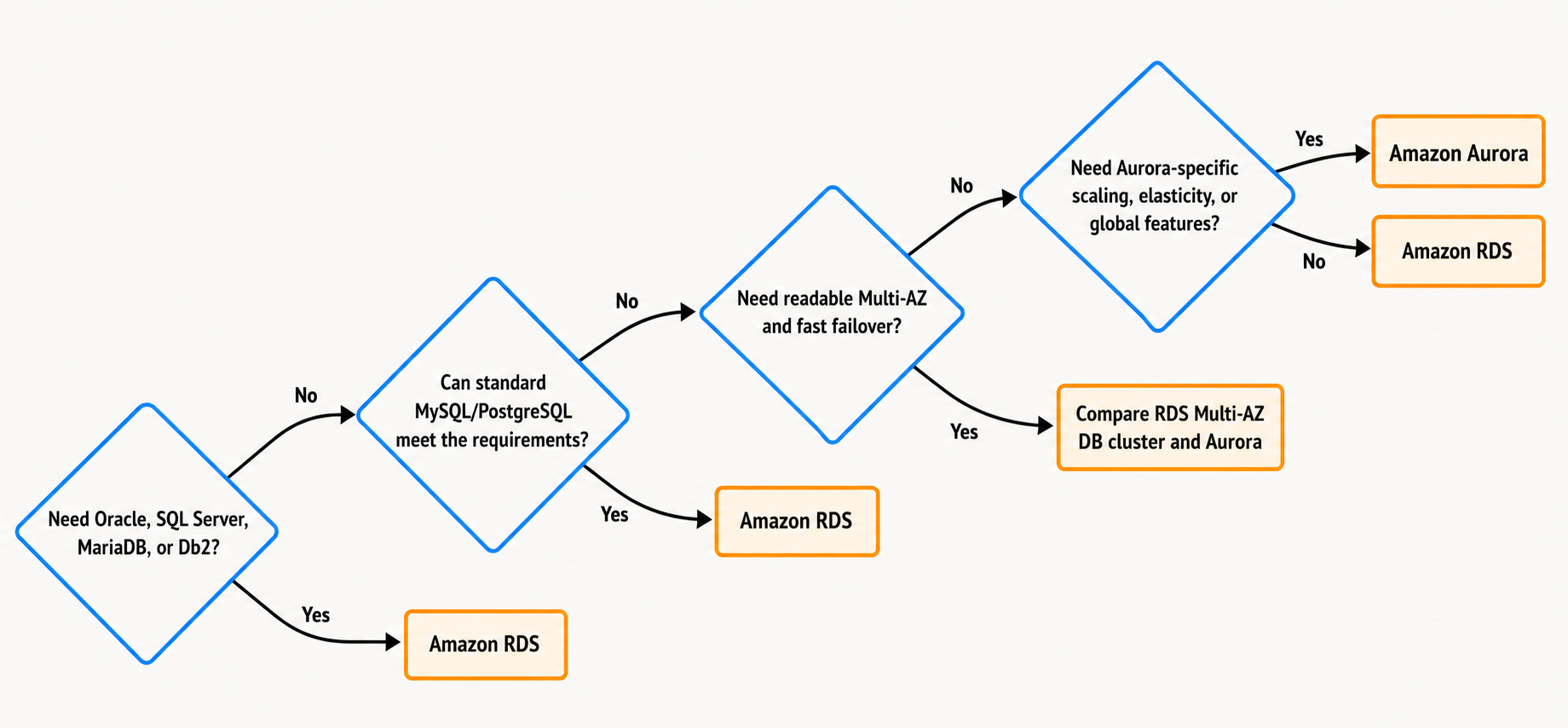
The decision tree helps narrow the options, but the final choice still needs to be checked against RTO, RPO, expected growth, compatibility, and total cost.
Choosing between Amazon Aurora and Amazon RDS
The difference between Amazon Aurora and Amazon RDS is primarily architectural. Amazon RDS offers broader engine choice and multiple availability models, while Aurora adds shared-storage read scaling, automatic storage growth, elastic compute, and Aurora-specific global capabilities.
Start with the workload: measure demand, define recovery targets, estimate growth, and check compatibility. If Amazon RDS already meets those requirements, keep the architecture simple. Choose Aurora when it solves a clear scaling, availability, or operational requirement.
If you need help evaluating or migrating an AWS database architecture, Stormit can assess your requirements, performance, and expected costs and help you choose an architecture that fits current demand and future growth.
FAQs
Yes. Aurora is a relational database engine within Amazon RDS, with its own distributed storage and replication architecture.
Not always. Total cost depends on compute, storage, I/O, replicas, availability, and scaling. Aurora I/O-Optimized and Serverless can change the economics for suitable workloads.
Aurora can provide higher performance and scalability for suitable workloads, but actual results depend on queries, indexing, memory, concurrency, instance class, and I/O. Benchmark the real workload before deciding.
It depends on the RDS architecture. Traditional RDS Multi-AZ DB instance deployments typically fail over in 60–120 seconds, while RDS Multi-AZ DB clusters typically fail over in under 35 seconds. Aurora typically restores service in under 60 seconds and often under 30 seconds when an eligible replica is available.
Evaluate Aurora when a MySQL- or PostgreSQL-compatible workload needs shared-storage read scaling, automatic storage growth, elastic compute, I/O-Optimized economics, or Aurora Global Database. If standard RDS already meets the requirements, it may remain the simpler choice.

An AWS Solutions Architect with over 5 years of experience in designing, assessing, and optimizing AWS cloud architectures. At Stormit, he supports customers across the full cloud lifecycle — from pre-sales consulting and solution design to AWS funding programs such as AWS Activate, Proof of Concept (PoC), and the Migration Acceleration Program (MAP).