AWS FinOps Agent: Find Out Why Your AWS Costs Changed
The AWS FinOps Agent is a new AWS service that investigates cloud cost changes to root cause and answers cost questions in plain language. Built on Amazon Bedrock, it connects the AWS cost tools you already use with CloudTrail activity and your own organizational context, then delivers findings where your teams already work, in Jira and Slack.
For most teams, the hard part is no longer spotting a cost spike. It is explaining it. A dashboard tells you what changed. The FinOps Agent is built to tell you why it changed, and who should act on it.
In this article, you'll learn:
- The AWS FinOps Agent answers cost questions, investigates anomalies, reports on a schedule, and turns savings recommendations into Jira tickets.
- Cost investigation is slow because it means joining cost data, CloudTrail activity, and ownership context by hand.
- The agent is read-only by default and writes outside itself in only three tightly scoped ways.
- During the preview, the agent is free (with a monthly usage limit) and runs in US East (N. Virginia), while reading cost data across your Regions.
- With Data Hub (preview), the agent can also answer cost questions about individual resources.
- Many organizations work with AWS partners like Stormit to set it up correctly and turn its findings into real savings.
Why Cost Investigation Needs Rethinking
A spike shows up on the AWS bill, and the detective work starts. Someone spots it in Cost Explorer or an anomaly alert, slices the data by service, account, and Region, digs through CloudTrail to find what changed, works out which team owns the resource, and then chases that team in Jira or Slack.
Every step is manual. Context lives in people's heads, tagging gaps hide ownership, findings get lost in chat threads, and monthly reviews start long after the money is spent.
Underneath it all, every team keeps asking the same question: "Why did our costs jump, and what changed?" Answering it means joining three kinds of data: cost data (Cost Explorer, anomalies, recommendations), operational data (CloudTrail API activity), and organizational context (owners, teams, rules). The AWS FinOps Agent does that joining for you.
What Is the AWS FinOps Agent?
The AWS FinOps Agent is an AWS service that brings an AI agent into cloud financial management. It entered public preview on 9 June 2026 and is built on Amazon Bedrock. It does four things:
- Answers: cost questions in plain language, grounded in your actual cost and usage data, including spend by service, account, Region, or tag, comparisons, and forecasts.
- Investigates: takes an anomaly to root cause, separating usage changes from rate changes and correlating them with CloudTrail activity.
- Reports: produces cost reports on a schedule as HTML, PDF, or editable PowerPoint.
- Optimizes: summarizes Cost Optimization Hub and Compute Optimizer recommendations into Jira tickets.
It does not replace your existing cost tools. It sits on top of them, reads their data, and adds the context and follow-through that those tools leave to people.
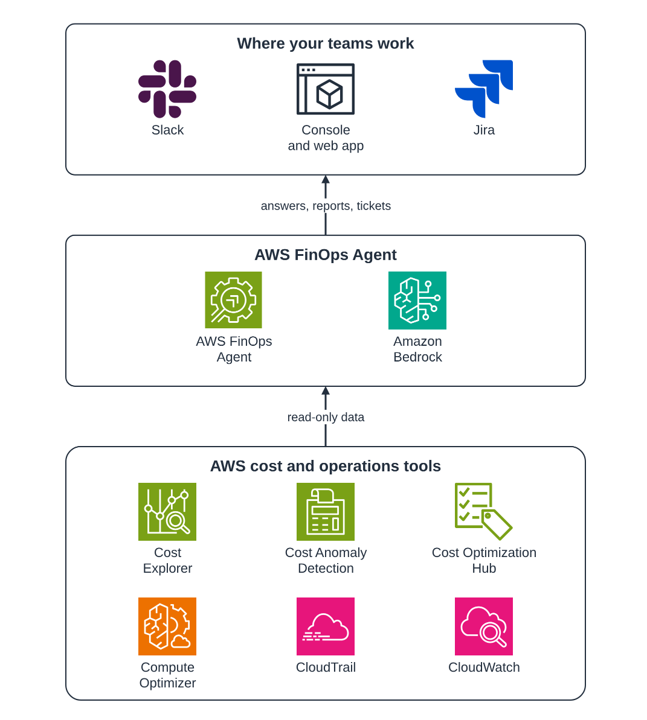
How the AWS FinOps Agent sits between your AWS cost tools and the places your teams work.
How the AWS FinOps Agent Differs from Traditional Cost Tools
FinOps Agent vs Cost Explorer Dashboards
Cost Explorer shows what you spent and where. It cannot tell you that a CloudFront line moved because a team changed a cache policy on Tuesday. The agent uses the same data, then adds CloudTrail activity and ownership context to explain the change.
FinOps Agent vs Cost Anomaly Detection Alerts
An anomaly alert tells you something changed. The agent takes the next step automatically: it investigates each anomaly as it arrives, ranks likely root causes by impact, and posts a summary to the owning team.
FinOps Agent vs Monthly Manual Reviews
Monthly reviews catch problems after the bill is locked in. With scheduled and event-driven automations, cost management becomes continuous: anomalies are investigated while they are still small, and reports arrive weekly without anyone building them.
How the AWS FinOps Agent Works in Practice
Agent, Web Application, and IAM Roles
Each agent is created through a five-step console wizard and is fully isolated from other agents. People work with it through a web application with Chat, Tasks, Automations, Artifacts, and Context files. Two IAM roles control access: the agent role defines what it can read (cost, usage, and CloudTrail data), and the operator role defines what the web application can do. The wizard can create both for you.
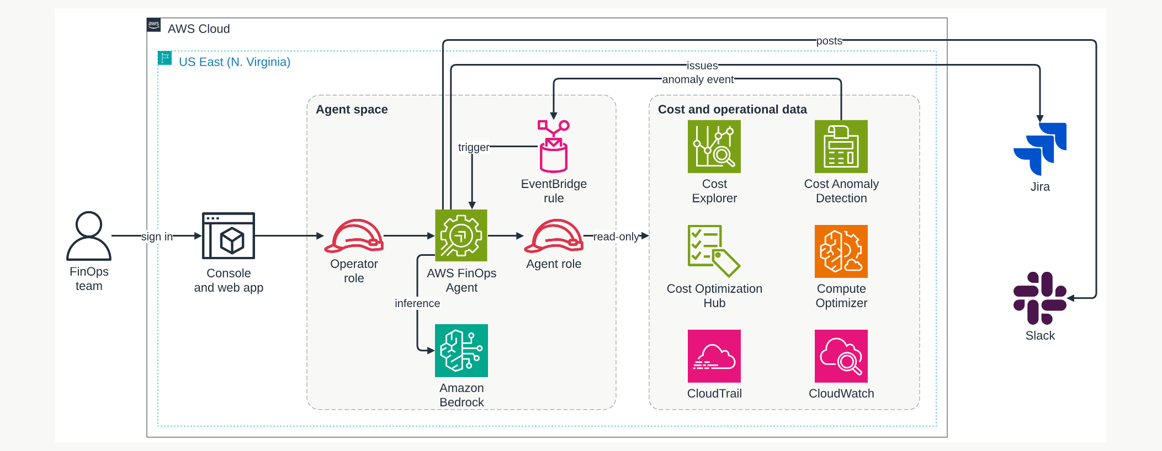
Architecture at a glance: the agent reads cost and operational data and delivers to Jira and Slack.
Guardrails Built In
The agent is read-only against your cost data. It can take only three actions outside itself: creating a Jira issue, adding a Jira comment, and posting a Slack message:
- Jira issues and comments from chat or on-demand tasks: you approve each one.
- Jira issues and comments from scheduled or event-based automations: pre-authorized when you set up the automation.
- Slack posts: never need approval, and every post is recorded in the task history.
Beyond that, it only manages the EventBridge rules it creates for its own automations. Every API call is logged in CloudTrail, and each event can be traced back to the individual user who started it.
How an Anomaly Investigation Flows
You describe the trigger and the response in one prompt, for example "Listen for Cost Anomaly Detection events, investigate each one for root cause, and post the findings to #finops-alerts." The agent then builds the automation: an anomaly event triggers a managed EventBridge rule, and the agent ranks root causes by impact and separates usage changes from rate changes. When it has CloudTrail permissions, it also correlates the change with API activity. It then posts a summary to Slack with an optional Jira issue.
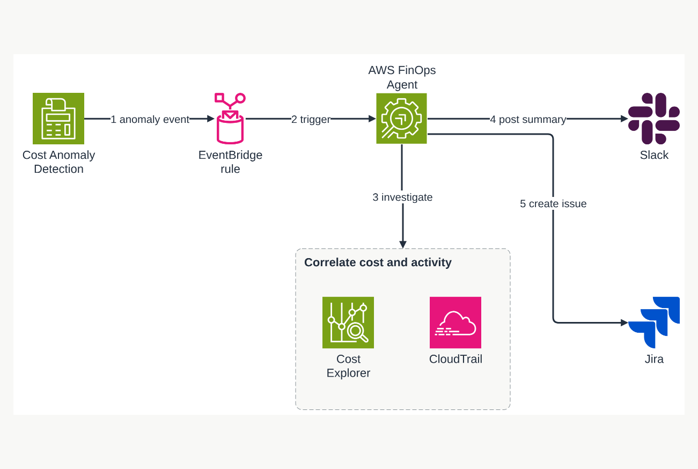
An event-driven anomaly investigation, from detection to Slack and Jira.
Context Makes the Difference
Context files turn a generic assistant into one that knows your organization. A simple CSV mapping accounts and services to owning teams and Slack channels lets the agent name the right owner for every finding. You can also add plain-language instructions, for example to report in USD or to flag services that grow more than 20% in a month, and the agent takes them into account in its answers.
Where to Deploy It
The "why" behind a cost change lives in CloudTrail, and each AWS account has its own. For organization-wide coverage, deploy the agent in a delegated administrator account or in your management (payer) account, and turn on organization access from the management account. This lets the agent check CloudTrail in the account where the spike actually happened. Without organization access, CloudTrail checks stay in the agent's own account.
Resource-Level Questions with Data Hub
With AWS Billing and Cost Management Data Hub (currently in preview), the agent can go beyond account and service summaries and answer questions about individual resources. For example, it can show which resources drove a recent cost increase and help you charge costs back to the teams that own them. AWS provides and updates the dataset, and the agent queries it for you, so you don't need to build or maintain a cost data pipeline.
Data Hub takes some setup. Create a dataset and turn on Data Hub for the agent. The dataset can take up to 24 hours to be ready, and Data Hub is currently available only in US East (N. Virginia). For organization-wide data, create the dataset in your management account. A dataset in a member account covers only that account.
What You Get
When we tested the agent on a real AWS account, the weekly automation posted a PDF report to Slack with totals, week-over-week change, the daily trend, and top services. More usefully, it explained why spend moved, in plain words.
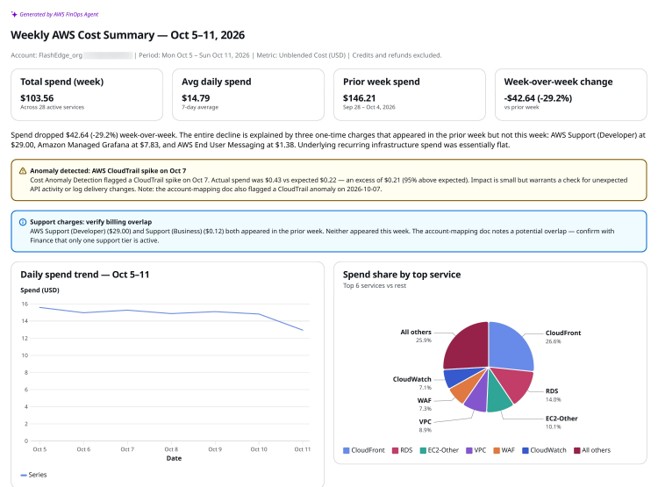
A weekly cost summary generated by the agent's scheduled automation.
Use Cases: Where the AWS FinOps Agent Delivers Real Value
For FinOps Practitioners
Lean FinOps teams can investigate every anomaly while it is still small, hand routine questions to the agent, and get recurring reports without building them by hand.
For Cloud and DevOps Engineers
Engineers can ask "why did my AWS costs go up last month?" in plain language and get an answer naming the services and usage drivers, in the Slack channel or Jira project they already use.
For CTOs, Tech Leads, and Founders
Leadership gets a clear, regular view of spend, an explanation of what moved, and confidence that each finding reaches an owner.
AWS FinOps Agent Pricing and Availability
During the public preview, the AWS FinOps Agent is offered at no additional charge, subject to a monthly usage limit. You still pay the standard per-request rate for AWS APIs it calls on your behalf, such as the Cost Explorer API. Cost Anomaly Detection, Cost Optimization Hub, Compute Optimizer, and CloudTrail Event History add no extra charge. AWS has not yet announced pricing for general availability.
The agent runs in US East (N. Virginia), where its data is stored and encrypted with AWS KMS. Its cost and usage data covers all AWS Regions, except the AWS GovCloud (US) and AWS China Regions.
Limitations and Considerations of the AWS FinOps Agent
The agent is a preview, so its behavior, scope, and pricing can change.
| Area | Current preview behavior |
| Region | US East (N. Virginia) only. |
| Quotas | 1 agent per account per Region (adjustable). 1 Jira and 1 Slack integration per account, and 2 Jira and 2 Slack connections per agent. |
| Integrations | Jira Cloud only: creates issues and comments, but does not update fields. Slack is one-way: posts only. |
| Identity | IAM users and roles. Federated identities are not supported. |
| Scope | FinOps questions, in English by default, AWS cost data only. |
Two more things matter in practice. First, the agent is not fully autonomous: treat its root cause as a starting point and cross-check early answers in Cost Explorer before acting. Second, it is only as good as its data and context: without Cost Optimization Hub, Compute Optimizer, an anomaly monitor, CloudTrail access, and an ownership mapping, investigations stop at "what" instead of "why" and "who".
Our advice is to start small: one agent, one Slack channel, one Jira space. Begin in chat with approvals, then automate what you trust.
Putting the AWS FinOps Agent into Practice
The AWS FinOps Agent moves cost investigation from dashboards and manual digging to an agent that explains, routes, and reports. But its value depends on the setup: the right account, the right permissions, CloudTrail access across your organization, and context that reflects how your teams actually work.
Want to see why your AWS costs really move? Stormit can help you set up the AWS FinOps Agent the right way, connect it to your teams, and turn its findings into real savings. Contact us to get started.
FAQs
An AWS service built on Amazon Bedrock that answers cost questions in plain language, investigates cost anomalies to root cause using CloudTrail, produces scheduled reports, and turns optimization recommendations into Jira tickets.
Not yet. It has been in public preview since 9 June 2026 and runs in US East (N. Virginia). Features, limits, and pricing may change before general availability.
It is free during the preview, subject to a monthly usage limit. Standard rates still apply for AWS APIs it calls, such as the Cost Explorer API. General availability pricing has not been announced.
No. It is read-only against your cost data. Outside the agent, it can only create Jira issues, add Jira comments, and post to Slack, plus manage the EventBridge rules for its own automations.
Yes. Deploy it in a delegated administrator account or in your management (payer) account, and turn on organization access from the management account so it can read cost data and check CloudTrail across member accounts.

A Cloud Engineer with hands-on experience in supporting the design, implementation, and optimization of AWS cloud infrastructures. At Stormit he contributes to customer projects across the cloud lifecycle assisting with architecture implementation, cloud migration support, monitoring, automation, and cost optimization initiatives while working closely with senior architects to deliver secure, scalable, and well-architected AWS solutions.