AWS vs GCP: A Practical Comparison for Choosing the Right Cloud Platform
Choosing between AWS and Google Cloud is more than selecting a cloud provider. It is a strategic infrastructure decision that affects development speed, operational complexity, cost predictability, scalability, security, and your team’s ability to keep innovating as the product grows.
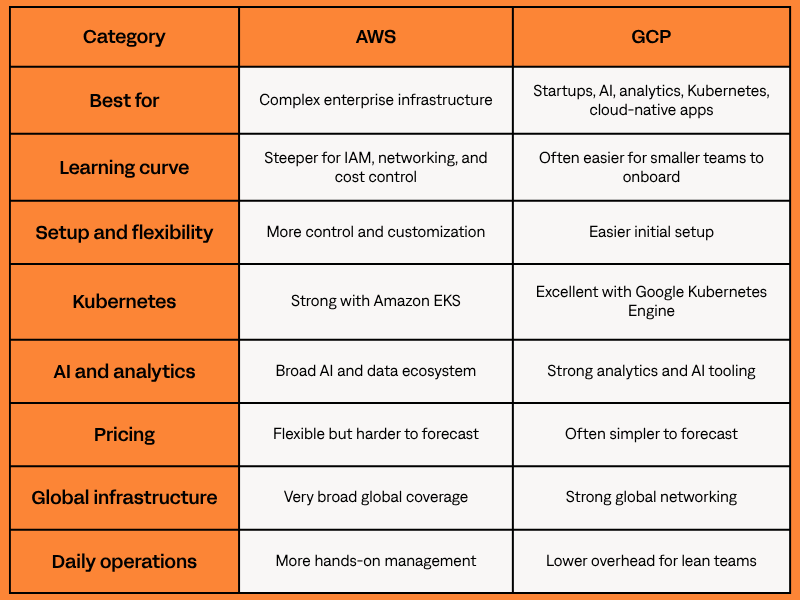
Both AWS and Google Cloud are mature platforms, but they follow different operating models. That is why the Google Cloud Platform vs AWS **decision should come down to architecture, team skills, and long-term scaling plans. AWS stands out for broad service coverage, enterprise maturity, and granular configuration options. Google Cloud is often stronger for streamlined operations, analytics, AI, Kubernetes, and global network performance.
This AWS vs GCP guide compares both platforms from a practical engineering perspective, focusing on the decisions that matter for a real product, startup, SaaS platform, internal system, or enterprise workload.
So if you’re asking “AWS vs Google Cloud, which is better?”, the answer depends on what you are building, how your team works, and which trade-offs you can manage as the product grows.
Quick Answer: AWS vs GCP in 60 Seconds
AWS vs GCP: What Actually Matters When Choosing a Cloud Provider
A lot of AWS vs GCP comparison articles focus too much on service lists. For developers and technical decision-makers, the better question is: which platform fits the team's current expertise, ecosystem, and workload type?
Cloud decisions become expensive to reverse once CI/CD, IAM, databases, monitoring, and deployment pipelines are built around one provider. For teams comparing Google Cloud and AWS ecosystems, the real challenge is balancing flexibility against operational simplicity.
💡 Many teams use the AWS Well-Architected Framework to evaluate reliability, security, performance, cost optimization, sustainability, and operational excellence before making long-term architecture decisions.
Complexity, Scalability, and Team Experience
Cloud infrastructure is only useful if your team can manage it safely.
AWS gives teams granular control over infrastructure, permissions, networking, autoscaling, integrations, and security policies. That flexibility is powerful, but it requires more cloud expertise.
GCP often feels easier to follow for smaller teams, especially around Kubernetes, analytics, and managed services.
🛠️Real-life example:
- A startup building its first SaaS product may move faster on GCP with Cloud Run, Cloud SQL, Cloud Storage, and Google Kubernetes Engine.
- AWS gives the same team more flexibility, but usually requires more work on VPCs, IAM, security groups, and cost controls.
📌Practical takeaway: AWS gives experienced teams more room to customize; GCP can be easier for smaller teams to operate.
Core Differences Between AWS and GCP
The difference between AWS and GCP becomes clearer when you compare the services developers use most often: compute, storage, serverless, databases, and networking.
Service Comparison
Compute: EC2 vs Compute Engine
Compute is where many cloud decisions start. AWS EC2 and Google Compute Engine both run virtual machines, but they differ in flexibility, configuration, and operational effort.
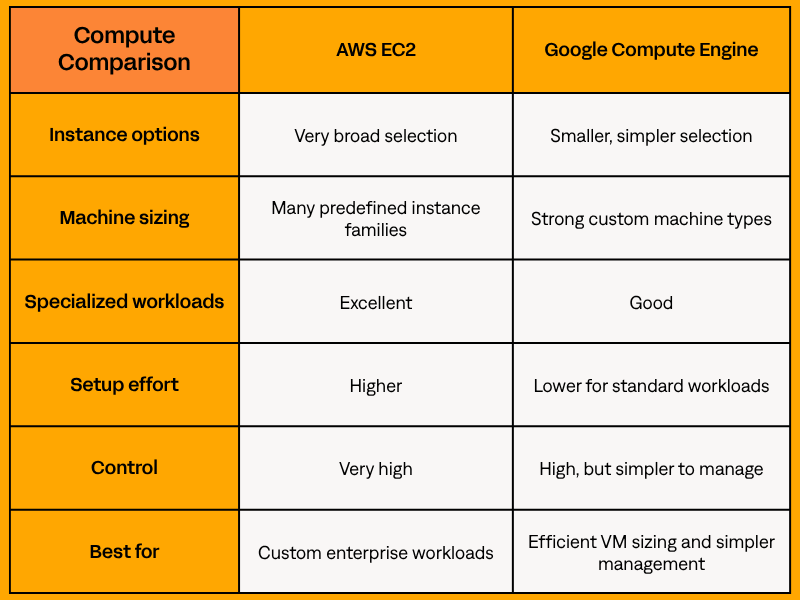
AWS offers a broad compute catalog, including general-purpose, memory-optimized, compute-optimized, GPU, and ARM-based Graviton instances for workloads that need specific tuning.
Google Compute Engine is often easier to size precisely because custom machine types let teams match CPU and memory to the workload.
AWS vs Google Compute: Which Is Better for Developers?
For most standard applications, both platforms are reliable. The difference is in control and complexity.
AWS EC2 is often better when infrastructure needs are highly specific. Compute Engine is often better when the team wants a simpler setup with efficient resource sizing.
🛠️Real-life example:
- A multiplayer gaming platform may benefit from AWS’s broad compute options, autoscaling, and global reach.
- A small SaaS company running dashboards, APIs, or background workers may prefer Compute Engine for easier configuration.
Storage: Amazon S3 vs Cloud Storage
Object storage supports backups, media files, static assets, data lakes, logs, exports, and application files.
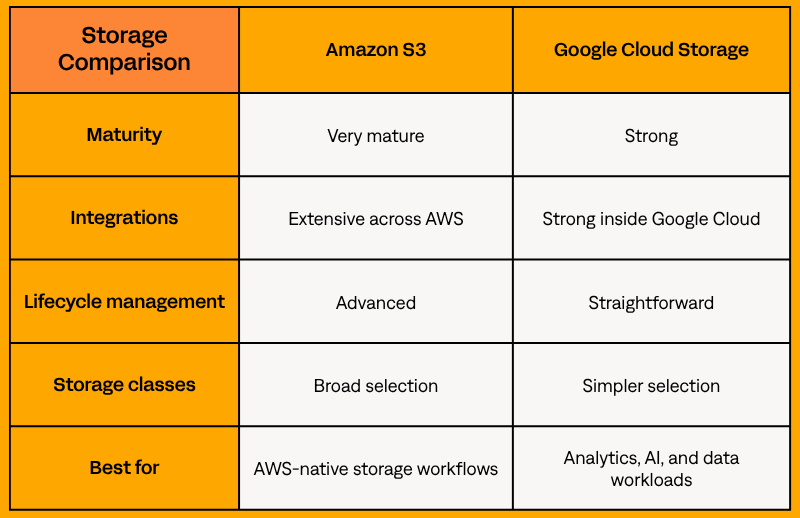
Amazon S3 is widely used for scalable object storage, lifecycle policies, and deep AWS integrations.
Google Cloud Storage is also highly scalable and often easier to work with when the workload is connected to BigQuery, Gemini Enterprise Agent Platform (formerly Vertex AI), or data processing pipelines.
🛠️Real-life example:
- A media platform may use Amazon S3 with Amazon CloudFront and AWS Lambda to store, process, and deliver content globally.
- A machine learning company may prefer Cloud Storage because it integrates smoothly with BigQuery, Gemini Enterprise Agent Platform, and data tools.
📌The practical takeaway:
S3 fits AWS-native workflows, while Cloud Storage is convenient for analytics, AI, and data workloads inside GCP.
Serverless: Lambda vs Cloud Functions
Serverless works well for APIs, event processing, automation, background jobs, and lightweight application logic.
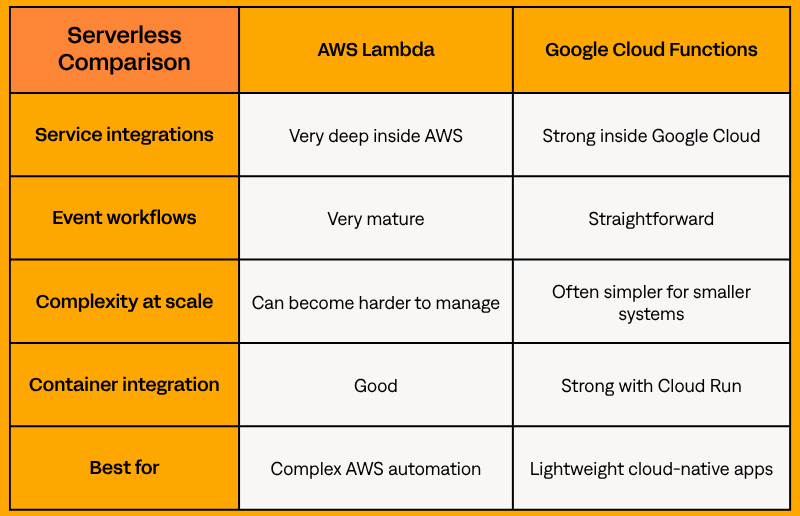
AWS Lambda is mature and integrates deeply with S3, API Gateway, DynamoDB, EventBridge, and Step Functions.
Google Cloud Functions, now part of Cloud Run functions, is simple for event-driven workloads, while Cloud Run is strong for containerized serverless apps.
🛠️Real-life example:
- An e-commerce platform may use AWS Lambda for payments, image optimization, inventory updates, and notifications.
- A smaller SaaS startup may deploy lightweight APIs faster on GCP with Cloud Functions or Cloud Run.
For teams exploring serverless patterns, Stormit’s overview provides a useful background on when serverless architecture makes sense: Introduction to Serverless Computing.
Databases: RDS vs Cloud SQL
Managed relational databases reduce work around backups, patching, replication, and availability.
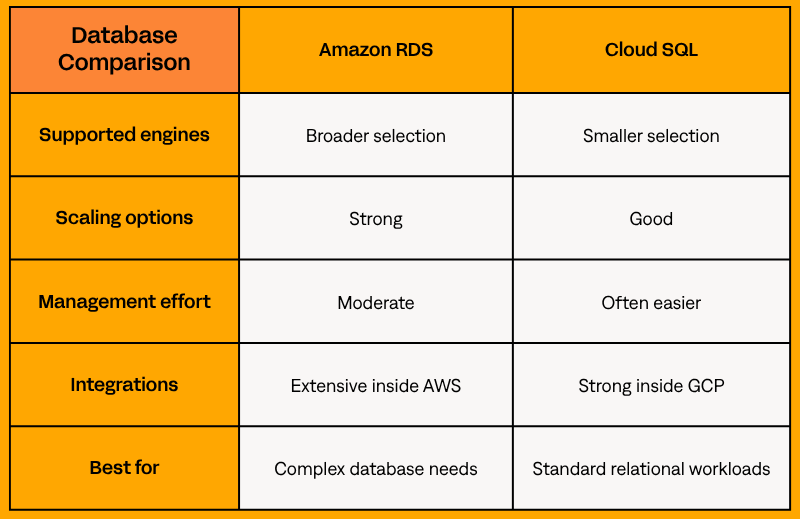
Amazon RDS supports PostgreSQL, MySQL, MariaDB, SQL Server, Oracle, and Db2, while Amazon Aurora provides MySQL- and PostgreSQL-compatible options for teams that need higher availability and performance inside AWS.
Cloud SQL supports PostgreSQL, MySQL, and SQL Server with a simpler management experience.
🛠️Real-life example:
- A scaling SaaS platform may choose Amazon Aurora for high availability, better read performance, and stronger scaling patterns.
- A smaller internal platform may be easier to run on Cloud SQL because it requires fewer infrastructure decisions.
Networking: VPC vs VPC Network
Networking becomes critical as applications grow across regions, teams, and compliance boundaries.
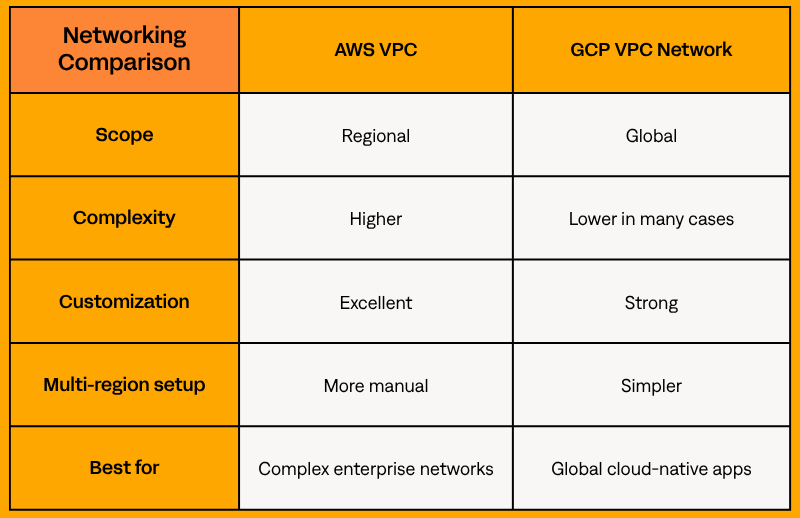
AWS VPC provides deep control over subnets, route tables, gateways, peering, security groups, and segmentation, but it requires strong networking discipline.
GCP VPC networks are global, which can simplify multi-region networking patterns.
🛠️Real-life example:
- A real-time collaboration tool may benefit from GCP’s global networking model and low-latency routing.
- A multinational enterprise that needs strict segmentation and complex routing may prefer AWS VPC.
Multi-cloud and Hybrid: AWS Outposts vs GKE Enterprise
Hybrid and multi-cloud needs can change the AWS vs GCP decision, especially when companies need local data processing, low-latency access to on-premises systems, data residency controls, or consistent governance across environments.
AWS Outposts extends AWS infrastructure, services, APIs, and tools to on-premises or edge locations. It fits teams that want a consistent AWS experience outside the public cloud, especially for local processing or low-latency workloads.
GKE Enterprise is Google Cloud’s enterprise Kubernetes platform for managing GKE and related capabilities across Google Cloud, on-premises, and other cloud environments. It is especially useful for Kubernetes-first teams that need consistent policy, governance, and workload management across environments.
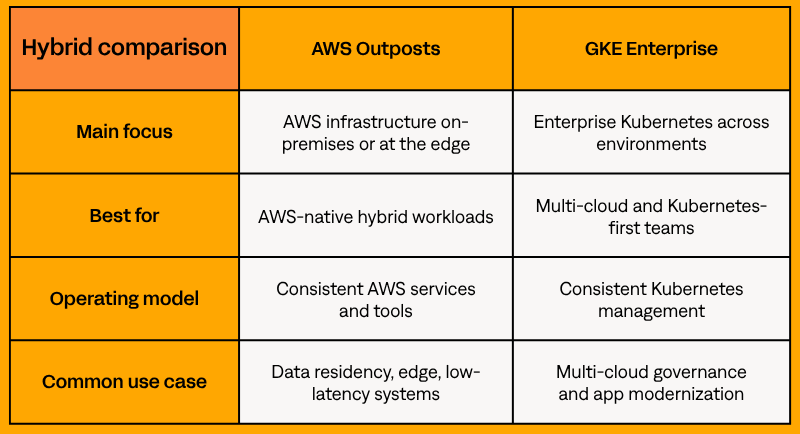
📌Practical takeaway: AWS Outposts is usually a better fit when the goal is to extend AWS infrastructure into local environments. GKE Enterprise makes more sense when the priority is Kubernetes-based workload management across multiple environments.
Generative AI: Amazon Bedrock vs Gemini Enterprise Agent Platform
Generative AI is now a major factor in the AWS vs GCP comparison, especially for teams building AI agents, internal copilots, automation tools, or customer-facing AI features.
Amazon Bedrock is AWS’s fully managed service for building generative AI applications with foundation models from multiple providers. It fits teams that want model choice, enterprise security, and tight AWS integration.
Gemini Enterprise Agent Platform is Google Cloud’s platform for building, deploying, governing, and optimizing enterprise AI agents. Google describes it as an evolution of Vertex AI, with broader support for model selection, agent development, orchestration, DevOps, and security.
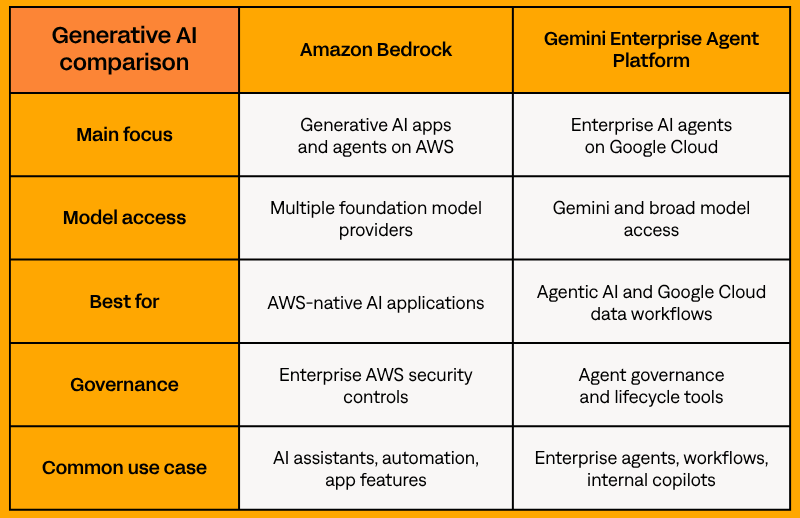
📌Practical takeaway: Amazon Bedrock fits teams that want to build generative AI inside the AWS ecosystem. Gemini Enterprise Agent Platform is especially relevant for companies building AI agents around Google Cloud data, security, and orchestration tools.
Cost Differences
Pricing matters, but it should not be the main reason to choose a cloud provider. This section focuses on practical cost behavior: predictability, flexibility, and hidden cost drivers.
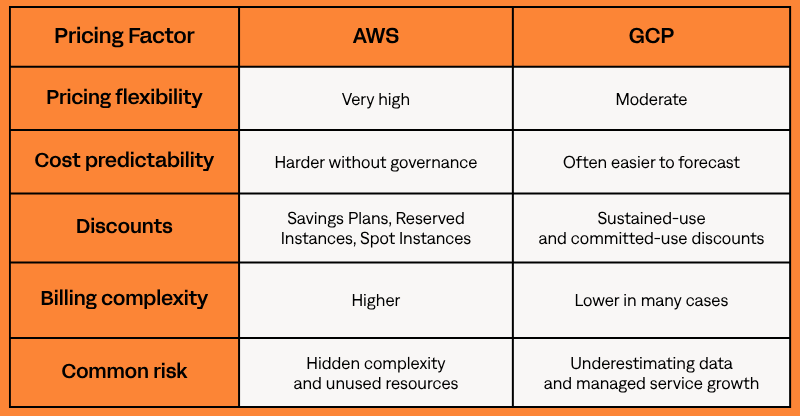
AWS pricing can be efficient when managed well, but costs can quickly grow through idle resources, oversized instances, cross-region traffic, NAT gateways, storage growth, data transfer, or poor scaling rules. An experienced AWS partner like Stormit can help identify waste, optimize architecture, and reduce costs before spending becomes harder to control.
GCP pricing is often easier to understand, especially for smaller teams. Sustained-use and committed-use discounts can make predictable workloads easier to budget.
Difference Between AWS and GCP Pricing Models
AWS pricing rewards optimization expertise. GCP pricing often rewards simplicity and predictable workloads.
🛠️Real-life example:
- A company running steady workloads may reduce costs on AWS with Reserved Instance/Savings Plans and careful rightsizing.
- A startup with predictable analytics workloads may find GCP easier to forecast.
While pricing models differ between AWS and GCP, real cloud costs are usually driven by how your infrastructure is designed and used.
💡*Stormit’s AWS cost optimization guide explains how architecture, usage patterns, and continuous review affect cloud spend.*
➡️Request a free cloud cost review! Understand what your setup could cost and where you can optimize before you deploy.
Performance, Reliability & Global Infrastructure
Performance and reliability depend on region selection, redundancy, failover, latency, monitoring, and architecture quality.
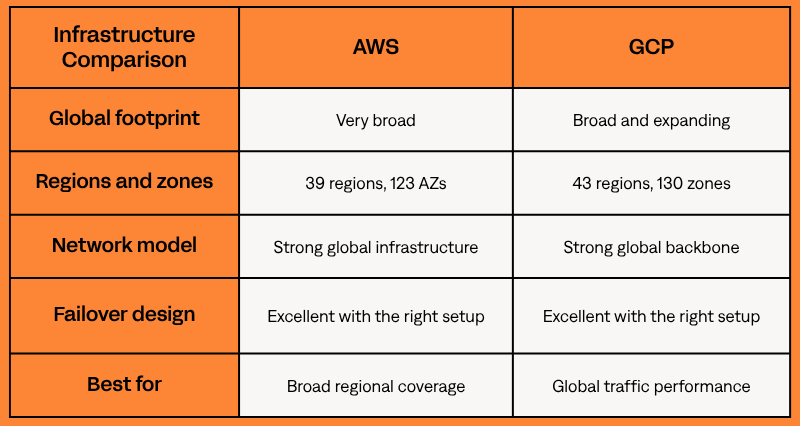
These numbers help with planning, but they do not make one provider better for every workload.
AWS vs GCP Reliability: Which Platform Is Safer for Scaling?
Both AWS and GCP provide enterprise-grade infrastructure. The reliability outcome usually depends more on architecture than on provider choice.
A poorly designed system can fail on either platform. A well-architected system can run reliably on both.
🛠️Real-life example:
- A global ecommerce platform may use multiple AWS regions to improve resilience during traffic spikes or regional outages.
- A real-time collaboration platform may benefit from Google Cloud’s network when latency consistency matters.
➡️A structured AWS Well-Architected Review can help uncover operational bottlenecks, resiliency gaps, and scalability risks before they become production issues.
💡Stormit’s renewable energy case study is a useful real-world example of why architecture reviews matter as systems grow AWS infrastructure optimization case study. The case study explains how fast architecture changes can make it harder to stay aligned with AWS best practices over time.
Security & Compliance: AWS vs GCP Security
Security is one of the most important areas in the Amazon Web Services vs Google Cloud comparison. Both platforms provide enterprise-grade security tools and compliance programs, but day-to-day management differs.
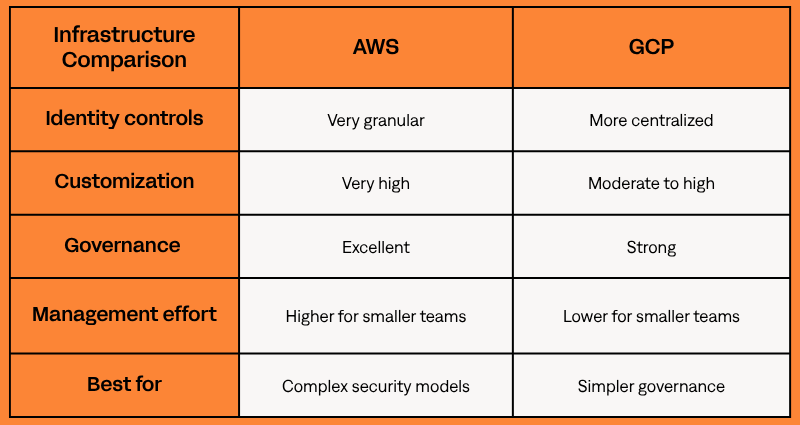
AWS gives organizations deep control over IAM, segmentation, policies, accounts, logging, and compliance tooling. That depth is valuable, but it can create misconfiguration risk without strong governance. GCP security often feels more centralized and easier to manage, especially for smaller teams.
AWS vs Google Cloud Security: Which Platform Is Easier to Manage?
For large enterprises, AWS provides a very mature and flexible security model. For smaller teams, GCP may be easier to manage consistently because the operational model can feel less fragmented.
🛠️Real-life example:
- A financial institution may rely on AWS Organizations, service control policies, IAM roles, and network segmentation for governance.
- A mid-sized SaaS company with a small DevOps team may find GCP easier to secure consistently.
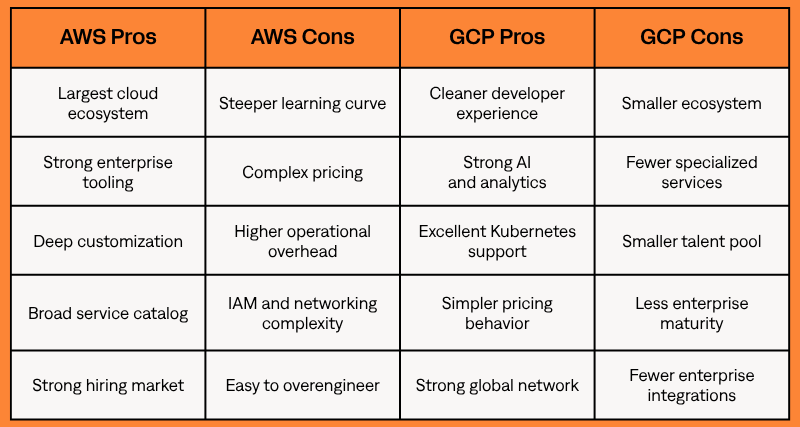
Pros and Cons Based on Real Usage
When to Choose AWS vs GCP Using a Decision Framework
This is where the AWS vs GCP decision becomes practical.
Choose AWS if…
AWS is usually the better choice if your infrastructure requires advanced customization, enterprise integrations, complex networking, specialized cloud services, or compliance-heavy architecture.
AWS is especially strong for:
- Enterprise SaaS platforms with complex customer environments
- Fintech systems with strict security and compliance requirements
- Large ecommerce platforms that need mature scaling patterns
- Companies with dedicated cloud engineering or DevOps teams
- Teams already invested in AWS tooling, skills, and architecture
🛠️Real-life example:
A fintech platform processing international transactions across regulated regions will often benefit from AWS because of its ecosystem maturity, advanced IAM controls, and infrastructure flexibility.
Choose GCP if…
GCP is often the better choice if you prioritize development speed, operational simplicity, Kubernetes, analytics, AI and machine learning, or cloud-native architecture.
GCP is especially strong for:
- AI startups building recommendation systems or model-driven products
- Analytics platforms processing large datasets
- SaaS teams that want simpler infrastructure management
- Kubernetes-heavy environments
- Teams that want to move quickly without building a large DevOps function early
🛠️Real-life example:
An AI startup building recommendation systems and analytics pipelines may move faster on GCP using BigQuery, Vertex AI, and Google Kubernetes Engine because these services are tightly connected to Google Cloud’s data and AI ecosystem.
Real-World Decision Framework
In practice, the AWS vs GCP decision often looks like this:
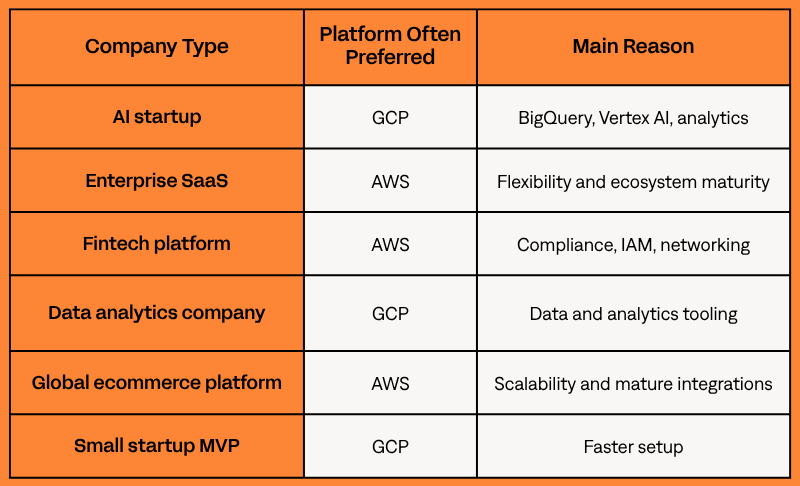
This is why the difference between AWS and GCP is rarely about services alone. The better choice depends on your engineering capacity and long-term operating model.
At this point, you probably have a rough idea of which platform fits your needs, but small details in your architecture can completely change that decision.
Schedule a free architecture consultation! We’ll help you validate your choice and recommend the best setup for your specific project.
AWS vs Google: Is One Platform Actually Better?
The AWS vs Google decision is not about which company is “better.”** It is about which cloud operating model fits your team.**
AWS offers deeper infrastructure control, customization, and enterprise maturity. Google Cloud often gives teams a cleaner path for analytics, AI, Kubernetes, and cloud-native development.
For smaller teams, the better cloud is usually the one that reduces operational friction. For larger enterprises, it is often the one with stronger governance, integrations, and customization options.
Final Verdict: AWS or GCP
The “AWS vs Google Cloud, which is better?” question depends entirely on your operational priorities and long-term product goals.
AWS is often stronger for enterprise infrastructure, custom architectures, complex networking, and large-scale distributed systems.
Google Cloud stands out for analytics, AI, Kubernetes, cloud-native development, and simpler operations.
For startups and modern SaaS teams, GCP can reduce overhead and speed up delivery. For enterprises, AWS often provides more flexibility and ecosystem maturity.
Your cloud choice will shape the architecture from day one, including how the system scales, how much it costs to run, and how difficult it is to manage.
A poor fit can create unnecessary complexity, higher costs, or scaling limits later.
For modernization or migration projects, a clear cloud migration strategy can make the provider decision much safer: AWS migration services.
Book a free AWS consultation! Get expert guidance on the right cloud architecture for your use case and make your decision with confidence.
FAQs
AWS offers more flexibility, enterprise maturity, and ecosystem breadth. GCP focuses more on streamlined operations, analytics, AI, Kubernetes, and cloud-native development.
GCP is often easier for startups because it reduces infrastructure overhead and offers strong analytics, Kubernetes, and AI tooling. AWS may be better for startups expecting complex scaling, enterprise integrations, or compliance-heavy growth.
Not necessarily. GCP pricing is often easier to forecast, while AWS can be highly cost-efficient when optimized well. In practice, cloud costs depend more on architecture, workload efficiency, and governance than provider pricing alone.
Google Cloud is often preferred for analytics and machine learning because of BigQuery and Vertex AI. AWS also has mature AI and ML services, including Amazon SageMaker.
Both platforms provide enterprise-grade reliability. Architecture quality usually matters more than provider choice.
Start with the workload. AWS is often better for deep infrastructure control, enterprise integrations, and complex networking. GCP may be more practical for analytics, AI, Kubernetes, or faster setup with a smaller team.

Experienced Cloud Engineer with expertise in designing, building, and overseeing cloud-based systems. Professionally certified in AWS, specializing in leveraging AWS services to create robust, scalable, and efficient infrastructure. The primary focus is on Amazon Elastic Kubernetes Service (EKS), with extensive knowledge in container orchestration and management.