Why Is AWS So Expensive? It Might Be the Way You’re Using It
In this article, you’ll learn:
- AWS pricing is driven by usage, architecture, and resource efficiency, with similar workloads ranging from around €50/month to €5,000+ depending on how well the environment is configured.
- The main cost drivers are compute (e.g. EC2), storage (e.g. S3 and backups), and especially data transfer, which is often underestimated but can become a dominant cost in high-traffic or API-heavy systems.
- AWS often feels expensive due to misconfigurations such as overprovisioned resources, unnecessary services (e.g. applying advanced protection where it isn’t needed), and poor pricing choices like relying on on-demand rates at scale.
- Real-world examples show that costs increase when setup does not match actual usage—such as overprotecting non-critical resources, overscaling containers, or using unoptimized CDN pricing—and can be significantly reduced without major infrastructure changes.
Is AWS Expensive or Is It About How It’s Used?
AWS can feel expensive very quickly.
You launch a few services, everything works, traffic grows a bit, and suddenly your monthly bill is much higher than you expected. At that point, it is easy to assume that AWS is expensive by default.
But most of the time, that is not the real issue.
AWS is built to be flexible. You can spin up almost anything in seconds, scale it instantly, and only pay for what you use. That sounds simple, but it also means it is easy to leave things running, choose resources that are too large, or overlook small costs that slowly add up.
So when people ask “Is AWS expensive?”, the better question is: are you actually controlling your setup, or just letting it run in the background?
How Much Does AWS Cost Per Month and What Is the Average AWS Cost for Small Businesses?
This is where things get frustrating. There is no simple answer to how much AWS costs.
Your bill depends on several factors:
- Compute, such as EC2 instances
- Storage like S3, backups, and snapshots
- Networking and data transfer, which is often underestimated
- Managed services like databases or queues
The average AWS cost for a small business usually looks something like this:
- €50 to €200 per month for early projects
- €500 to €2,000 per month for growing applications
- €5,000 or more once things start scaling
If you are wondering how much AWS costs per month, the answer depends less on traffic and more on decisions.
For example, two slightly oversized EC2 instances, a managed database, and constant data transfer can easily cost more than a lean setup handling more users. Small inefficiencies compound over time and become real money.
If you want to estimate your own setup, you can use the AWS calculator.
Why It Feels Like AWS Is Expensive (And What’s Actually Driving Your Costs)
If your bill feels too high, there is usually a clear reason behind it. These are the most common ones:
1. You are running bigger instances than you need
It is common to play it safe and choose larger instances. But if your CPU usage sits at 10 to 20 percent, you are paying for capacity you are not using.
2. You have resources no one is using
Old environments, forgotten volumes, or test instances often stay active longer than intended. They keep generating costs quietly.
3. Data transfer is adding up
Moving data between regions or out of AWS is easy to overlook. It can quickly become one of the biggest cost drivers.
4. Everything runs on on-demand pricing
On-demand is the default and also the most expensive option. If your workload is stable, this approach can significantly increase your bill.
5. You are not actively watching costs
If you only check your bill at the end of the month, you’re reacting too late—by then, the cost is already locked in.
In most cases, oversized instances are the biggest cost driver.
It usually starts with good intentions: choosing larger instances to avoid performance issues. But those decisions are rarely revisited, even as usage drops.
In practice, CPU utilization often sits at 10–20% while teams keep paying for far more capacity than they need.
You’re paying for performance you don’t use.
More details on AWS pricing are available here.
You’re Not Alone: Most People Struggle With This
Almost every team goes through this. And yes, it often happens earlier than people expect.
Everything seems fine until one day the bill jumps and no one can clearly explain why.
Even experienced developers run into this problem because AWS pricing is not always intuitive. Costs are spread across multiple services, regions, and small usage details that seem insignificant on their own.
The important thing to remember is that this is normal and it can be fixed.
What You Can Do Right Now
You do not need a full audit to start improving things. A few simple steps can already make a difference:
1. Check for idle resources
Look for anything that is running but not actively used.
2. Right-size your setup
If your resources are underutilized, scale them down. You can always scale back up later.
3. Set budget alerts
Get notified before costs get out of control, not after.
4. Review data transfer
Take a closer look at how data moves between services and regions.
5. Consider savings plans
If your usage is predictable, this is one of the fastest ways to reduce costs.
📞 Not sure where to start? Book a free session, and we’ll go through your AWS account together.
Real-world examples: How Stormit optimized AWS costs
To show you how these principles work in practice, here are three examples of how we helped our clients transform their "expensive" AWS bills into lean, efficient machines.
1. High Security & Performance Without the Overspending
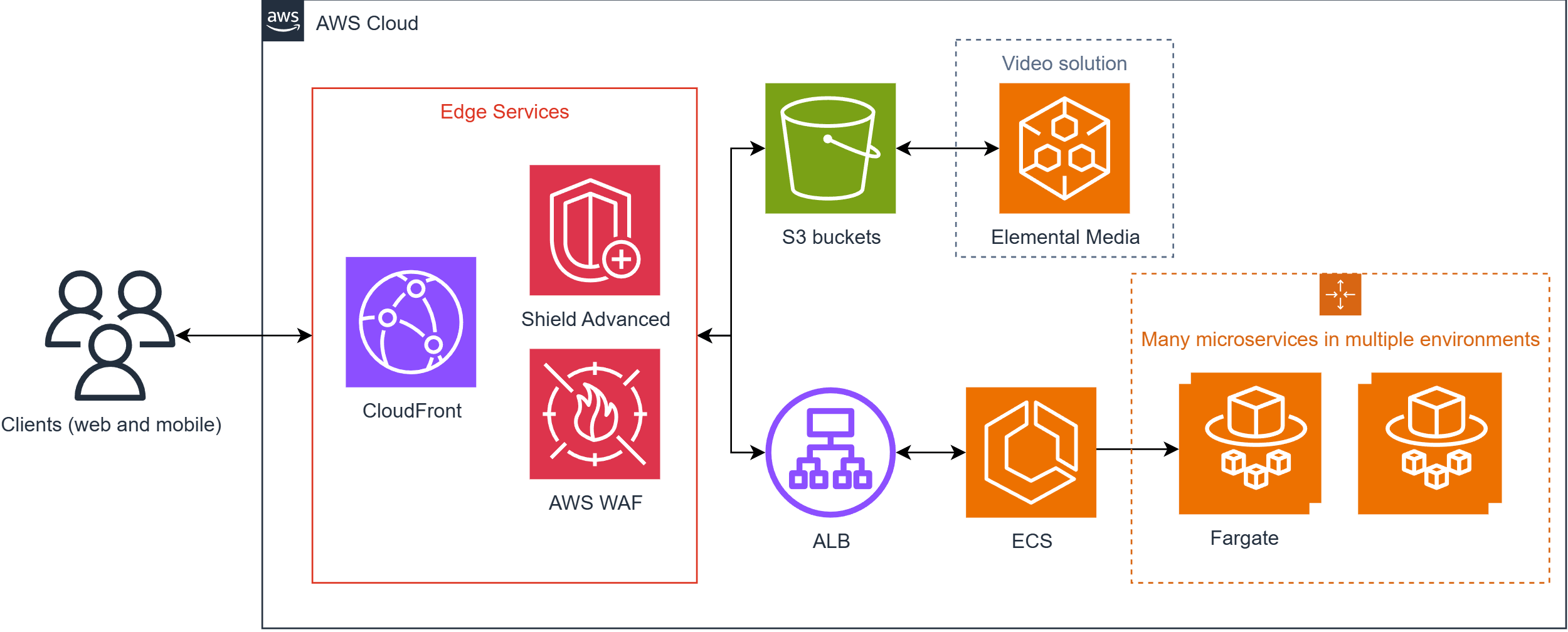
We worked with a major media customer in Germany facing frequent DDoS attacks. They were initially using AWS Shield Advanced, which costs $3,000 per month plus data transfer fees. They also used ECS (Elastic Container Service) and S3.
- The problem: They were applying Shield Advanced protection to all services, including S3 buckets that scale inherently and don’t require that level of overhead, despite clear evidence that the attacks were targeting their APIs.
- The solution: We moved their media delivery to a combination of AWS WAF and CloudFront, removing Shield Advanced from the parts of the infrastructure where it wasn't necessary. This saved thousands of dollars on AWS Shield Advanced data transfer fees.
- Right-Sizing the containers: We also found that their ECS (Elastic Container Service) environments, especially in Development, were heavily over-provisioned.
- The action: We analyzed their usage statistics and "right-sized" the environment by scaling down the minimum and maximum number of tasks to match actual demand.
- The result: By combining smarter security architecture with container right-sizing, we stopped them from paying for capacity they weren't using.
2. Providing credits for Startups
For one of our startup clients, the biggest hurdle wasn't just the cost, but the unpredictability of a growing application.
- The challenge: They needed to test their setup but couldn’t afford to learn through costly mistakes.
- The solution: We helped them secure $10,000 in AWS credits.
- The impact: This allowed them to monitor their spending and see what was truly expensive without financial risk. It gave them the freedom to optimize their design before they had to pay out of pocket.
If you’re facing a similar challenge, you can learn exactly how AWS startup credits work and how to get them in our detailed guide to AWS startup credits.
3. Lowering content delivery costs by 80%
Another Media industry customer was struggling with massive data transfer costs—one of the most underestimated parts of an AWS bill.
- The problem: Using standard on-demand pricing for Amazon CloudFront (CDN) was becoming unsustainable as their traffic scaled.
- The solution: We optimized their pricing strategy and, as an AWS reseller, were able to secure more favorable CloudFront pricing aligned with their traffic scale.
- The result: We successfully lowered their CloudFront costs by up to 80%, proving that even the right service can be "expensive" if you aren't on the right pricing plan.
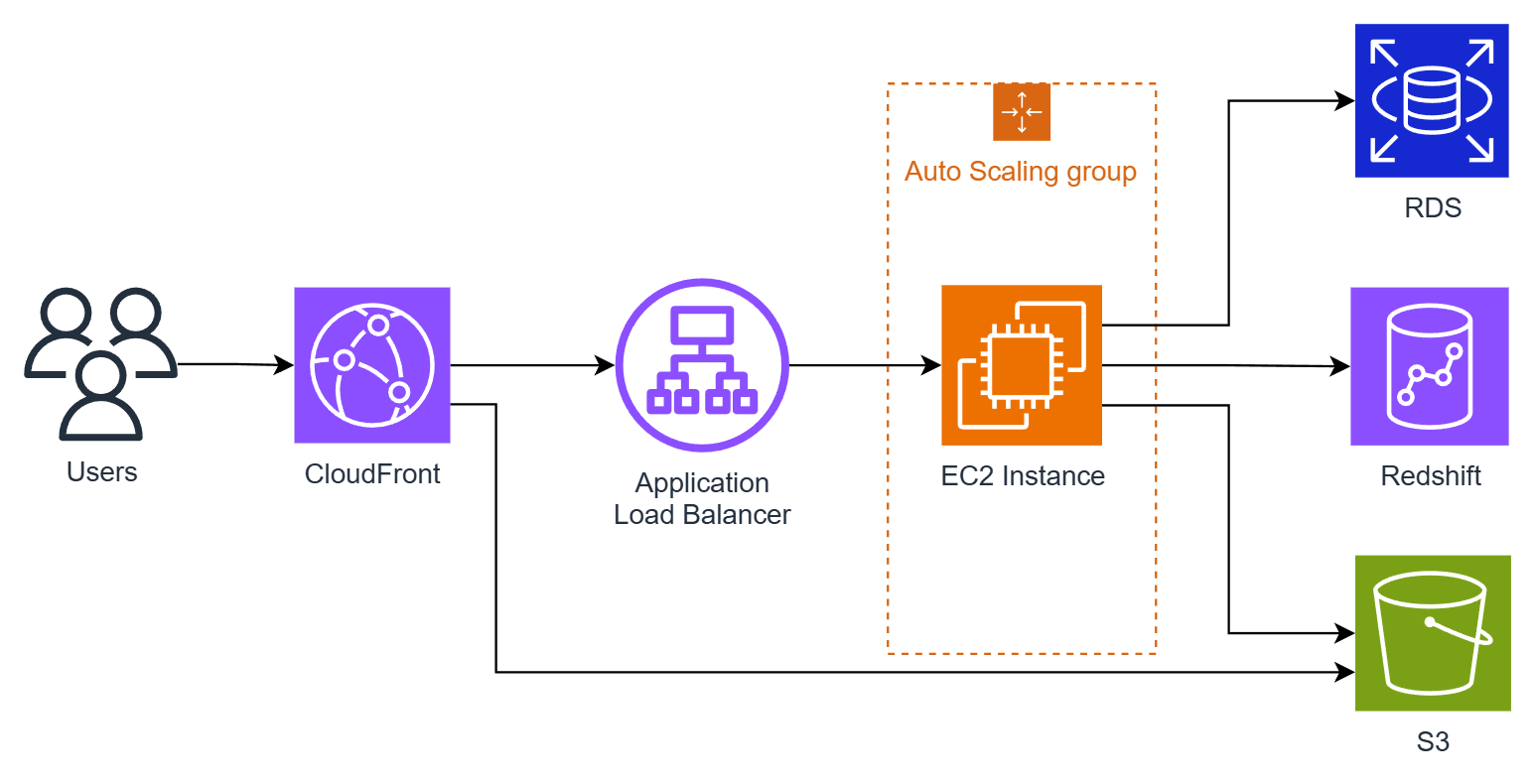
If your data transfer costs are getting out of control, discover how our CDN services help reduce CloudFront costs and optimize delivery for high-traffic applications.
Summary: Why Is AWS So Expensive and What It Really Means
If you keep asking why is AWS so expensive, the answer is usually not that AWS itself is overpriced.
In most cases:
- Resources are larger than necessary
- Some services are running without a clear purpose
- Costs are not being actively managed
The good news is that these issues are common and fixable. You often do not need major changes to see improvements.
A bit of visibility and a few practical adjustments can significantly reduce your AWS bill.
FAQs
It can be. If you leave resources running, costs increase quickly. If you manage usage actively, it can stay very affordable.
It depends on how you use it. Inefficient setups can make AWS look more expensive than it actually is.
It can range from tens to thousands of euros. The biggest factor is how your infrastructure is designed and managed.
Not inherently. However, it can become expensive quickly if costs are not monitored and optimized.

A Cloud Engineer Intern with hands-on experience in supporting the design, implementation, and optimization of AWS cloud infrastructures. At Stormit he contributes to customer projects across the cloud lifecycle assisting with architecture implementation, cloud migration support, monitoring, automation, and cost optimization initiatives while working closely with senior architects to deliver secure, scalable, and well-architected AWS solutions.