AWS AI Services: How to Choose the Right AI Tools for Your Use Case
AWS AI services cover foundation models, AI agents, document processing, speech, computer vision, recommendations, developer tools, and custom machine learning. Across the wider AWS artificial intelligence services portfolio, the hard part is no longer finding an AI capability. It is choosing the right service, or combination of services, for the problem you actually need to solve.
This guide goes beyond a simple product list. It shows how AWS AI services are organized, which ones work together, and when to choose a purpose-built API, Amazon Bedrock, or Amazon SageMaker AI.
The aim is to help you evaluate AI on AWS without adding unnecessary cost or complexity.
Quick summary
- Amazon Bedrock is usually the first place to look for generative AI applications, while Amazon Bedrock AgentCore becomes relevant when those applications need tools, memory, identity, or the ability to act across other systems.
- Purpose-built AWS AI services are often a better fit for narrow, predictable tasks such as optical character recognition (OCR), transcription, translation, image analysis, structured natural language processing (NLP), and recommendations because the output is already well defined.
- Amazon SageMaker AI becomes relevant when you need deeper control over training, deployment, inference infrastructure, or the wider model lifecycle. Bedrock also supports model customization, so the distinction is about how much control you need.
- The most reliable way to choose is to start with the workload. Define the output, data, latency, security, control, and cost requirements first, then work backward to the smallest architecture that meets them.
Why choosing between AWS AI services is harder than it looks
The difficulty with Amazon Web Services AI is not the number of products alone. The AWS AI portfolio spans very different abstraction levels: purpose-built APIs, foundation-model platforms, agent infrastructure, and complete business or developer workflows.
Teams comparing AWS AI tools can therefore end up putting products side by side that solve different parts of the stack.
In production, several can appear in the same solution. A support system might use Amazon Connect for the contact-center layer, Amazon Transcribe for speech-to-text, Amazon Bedrock for response generation, and AgentCore only when the assistant needs to update a CRM or trigger another system. A document pipeline might use Amazon Textract to extract tables and fields and bring Bedrock in later when the content needs interpretation.
So the useful question is not “Which AWS AI service is best?” It is “Which service should handle this part of the workload?”
That is why a static list of AWS AI services is not enough. A useful AWS AI services list also needs to show where each service fits and which ones work together.
For teams comparing Amazon Web Services AI capabilities, the main risk is often over-engineering. A general-purpose model may be able to solve a task, but that does not make it the simplest or most predictable choice.
💡 A practical starting point: if AWS already has a purpose-built API that returns exactly what you need, test that first. Bring in generative AI when the workload genuinely needs flexible generation, reasoning, interpretation, or agentic behavior.
AWS AI services at a glance: choose by the outcome you need
| If you want to... | Start with... | Why |
| Build a generative AI application | Amazon Bedrock | Managed foundation models plus retrieval-augmented generation (RAG), guardrails, evaluation, and GenAI tooling |
| Build an AI system that can take actions | Amazon Bedrock AgentCore | Runtime, memory, tool access, identity, observability, and agent controls |
| Extract text, forms, tables, and layout | Amazon Textract | Purpose-built document extraction |
| Extract semantic information from mixed documents and media | Amazon Bedrock Data Automation | Generative multimodal extraction |
| Convert speech to text | Amazon Transcribe | Batch and streaming speech recognition |
| Convert text to speech | Amazon Polly | Managed text-to-speech |
| Translate text | Amazon Translate | Managed machine translation |
| Analyze sentiment, entities, personally identifiable information (PII), or text categories | Amazon Comprehend | Structured NLP APIs |
| Analyze images or video | Amazon Rekognition | Managed computer-vision APIs |
| Build a structured intent-based bot | Amazon Lex | Voice/text bots with intents and slots |
| Generate personalized recommendations or rankings | Amazon Personalize | Managed recommendation models |
| Give employees an AI workspace | Amazon Quick | Research, business intelligence, and workflow automation |
| Start a new AI-assisted IDE workflow | Kiro | Recommended starting point for new IDE-based development |
| Continue an existing Q Developer IDE workflow or use AI in the AWS Management Console | Amazon Q Developer | Existing IDE users can continue until April 30, 2027; the console experience remains available |
| Modernize supported legacy workloads | AWS Transform | Specialized agentic modernization workflows |
| Build an AI-enabled contact center | Amazon Connect | Customer-service platform with native AI capabilities |
| Build, train, or deeply control your own models | Amazon SageMaker AI | Custom model development and inference control |
Real AWS AI solutions often combine several of these. The table is a first filter, not a rule that every project belongs to one product.
Understanding the AWS AI portfolio: five practical layers
The AI services in AWS are easier to navigate as five practical layers: generative AI, purpose-built AI APIs, custom machine learning, business AI, and developer AI. This is a decision framework, not an official AWS taxonomy.
These layers are complementary rather than competing categories, and a production workload may use capabilities from several of them.
For the current AWS product view, see the official AWS AI services overview.
Generative AI: build with foundation models
Amazon Bedrock is the main AWS platform for generative AI applications with managed foundation models, including assistants, RAG, content generation, and multimodal workloads.
📖 For a closer look at the platform, see Stormit’s Amazon Bedrock guide.
Amazon Bedrock AgentCore becomes relevant when an application moves beyond answering and starts using tools, maintaining memory, or taking actions across systems.
Amazon Nova, for example, is a model family; Bedrock is the platform around it. In practice, choose the service layer first, then the model that fits the use case.
Purpose-built Amazon AI services: use a defined API when the task is defined
Purpose-built Amazon AI services handle tasks where both the input and output are relatively clear: extract a table, transcribe a call, translate a paragraph, detect PII, analyze an image, or rank products.
They may be less flexible than generative AI, but they are often easier to validate and operate. Transcribe already handles speech-to-text, while Textract is designed for forms and tables.
A foundation model can add token cost, latency, validation work, and output variability to a task that was predictable to begin with. Across the wider AWS AI offerings, flexibility is not automatically an advantage when AWS already exposes the required output through a dedicated API.
Custom machine learning: move deeper only when the use case requires it
Amazon SageMaker AI belongs here, but this article deliberately keeps it brief. Bedrock already supports several model-customization paths, while SageMaker AI becomes the stronger fit when you need deeper control over training workflows, model artifacts, and deployment infrastructure.
That control can also matter for cost, latency, and throughput trade-offs. A proprietary equipment-failure model built from your own telemetry may need it; an internal RAG assistant probably does not.
We cover training, MLOps, inference, and the wider lifecycle in our AWS machine learning services guide. Here, SageMaker AI is the hand-off from managed AI into custom model engineering.
Business AI: use the finished workflow when AWS already provides it
Some AWS AI products already package the surrounding workflow, so the better decision is not always to compose lower-level services. Amazon Quick provides an AI workspace for research, business intelligence, and workflow automation, while Amazon Connect applies AI inside a complete customer-service and contact-center platform.
If the requirement already matches one of those workflows, evaluate the finished product before rebuilding it from lower-level services.
Developer AI: AI for the people building and modernizing software
Kiro, Amazon Q Developer, and AWS Transform support different developer workflows, so the right choice depends on where you plan to use the tool and whether you already have Q Developer access.
For a new IDE-based coding workflow, Kiro is the recommended starting point. Since May 15, 2026, AWS has blocked new Q Developer Free Tier account creation through Builder ID in IDE plugins and new Q Developer subscription creation through the AWS Console. Existing Q Developer IDE users can continue using the plugins until April 30, 2027.
Amazon Q Developer in the AWS Management Console remains available for AWS-focused assistance. AWS Transform addresses a different requirement again, applying specialized agentic workflows to supported modernization scenarios.
⚠️ Important AWS AI availability changes in 2026
Older comparisons of AWS AI products can now be misleading.
Amazon Bedrock Agents is now Amazon Bedrock Agents Classic and has not been open to new customers since July 30, 2026. Existing customers can continue using it, but AWS directs new agent workloads toward Amazon Bedrock AgentCore. Amazon Bedrock itself remains available.
Amazon Kendra is no longer open to new customers as of July 30, 2026, and AWS recommends Amazon Bedrock Knowledge Bases for similar new search and RAG workloads.
Amazon Q Business is no longer open to new customers as of July 31, 2026, with AWS pointing new customers toward Amazon Quick for similar capabilities. Existing customers can continue using both services.
Several SageMaker AI features, including Ground Truth, Model Monitor, Clarify, and Debugger, are also closed to new customers as of July 30, 2026; other SageMaker AI capabilities remain available. Amazon Comprehend topic modeling, event detection, and prompt safety classification, plus Amazon Rekognition Streaming Video and Bulk Image Analysis, are closed to new customers as of April 30, 2026.
💡 Before standardizing on any of the AWS AI services, check current availability, Region support, quotas, and lifecycle notices. An architecture guide from last year may already point you toward something you would not choose for a new deployment today.
Choosing between AWS AI services can quickly become an architecture decision rather than a product comparison. If you need a second opinion on how the AI layer fits your wider AWS environment, Stormit can help evaluate the options before you commit to production. Explore your AWS AI options.
Choose the AWS AI service by the output you need
Instead of walking through the portfolio product by product, this section starts with the result you are trying to produce. That is usually the fastest way to narrow the AWS AI tools that are actually relevant.
I need generation, reasoning, RAG, or multimodal answers
Start with Amazon Bedrock.
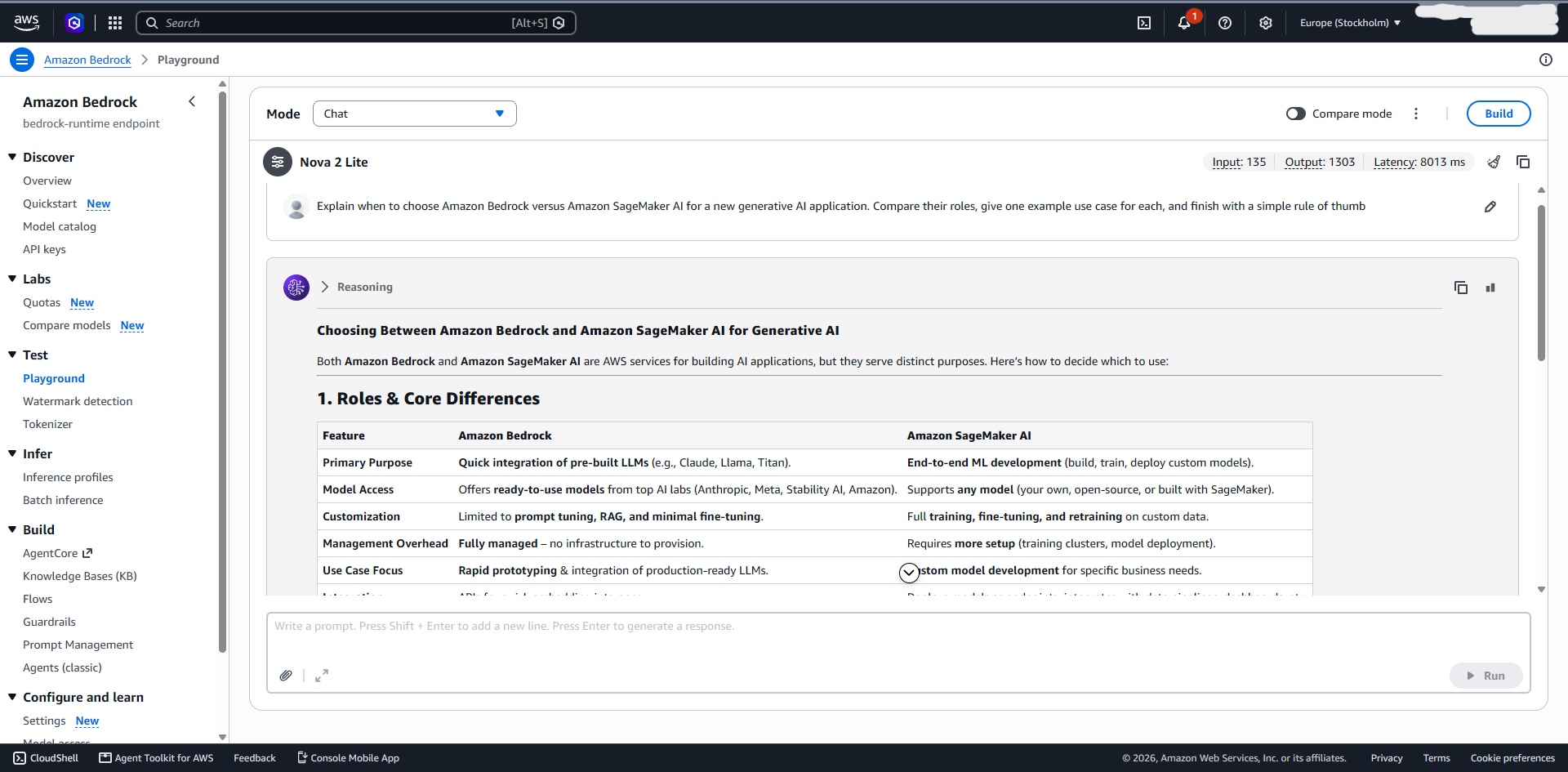
Bedrock lets you build with foundation models without managing the underlying model-serving infrastructure. Typical workloads include assistants, RAG, summarization, content generation, and multimodal applications.
An internal engineering assistant, for example, could retrieve runbooks from S3 and use Bedrock to generate grounded answers. If the problem is mainly prompts, grounding, context, model choice, and response quality, Bedrock is usually closer to it than SageMaker AI.
I need the AI system to take actions
Evaluate Amazon Bedrock AgentCore when the application moves from answering questions to taking actions through tools or other systems.
A support assistant that only answers “What is our refund policy?” does not need the same infrastructure as one that checks an account, creates a refund request, or updates a CRM.
Once the system acts, tool access, identity, memory, observability, failure handling, and approvals become part of the architecture.
⚠️ For higher-risk actions, an agent can prepare the request while deterministic validation or human approval controls execution.
I need structured data from documents
Start with Amazon Textract when you need text, handwriting, tables, forms, and layout.
For example, an invoice-processing workflow could use Textract to extract supplier details, line items, totals, and dates. Application logic can validate the fields, while Bedrock is only brought in when unusual supporting documents need interpretation or summarization.
If your document volume is large and access patterns are difficult to predict, storage economics matter too.
📖 Stormit’s S3 Intelligent-Tiering guide covers one option for managing changing S3 access patterns.
I need semantic extraction from documents, images, audio, or video
Evaluate Amazon Bedrock Data Automation.
It is more relevant when the required output depends on semantic interpretation across varied unstructured or multimodal content. An insurance workflow, for example, may need to process claim forms, photos, supporting PDFs, and other media together.
Textract and Bedrock Data Automation overlap, but they solve different versions of the problem. For predictable document structure, Textract is usually simpler. Data Automation becomes more useful when the inputs vary significantly or the extraction itself requires semantic interpretation.
I need speech-to-text or text-to-speech
Use Amazon Transcribe for speech-to-text and Amazon Polly for text-to-speech.
A meeting-intelligence tool might use Transcribe for the transcript and Bedrock for summaries and action items. A voice-support application could use Transcribe on input, Bedrock for reasoning, and Polly on output.
Keeping the steps separate makes transcription accuracy and generation quality easier to test independently.
I need translation or structured language analysis
Use Amazon Translate for direct machine translation and Amazon Comprehend for structured NLP such as sentiment, entities, PII detection, and classification.
A support platform might Translate incoming messages before Comprehend tags them for sentiment or PII. Bedrock becomes more relevant when the task shifts toward rewriting, summarization, richer context, or instructions that do not fit a fixed schema.
This shows why AWS artificial intelligence services should be selected by output, not by whichever model is getting the most attention.
I need image or video analysis
Use Amazon Rekognition when the task maps to a defined computer-vision capability such as labels or moderation.
A media platform could use Rekognition during upload to identify or flag known categories. If the question becomes “Explain what is happening in this image and why it may violate our policy,” a multimodal model through Bedrock is closer to the requirement.
I need a structured conversational flow
Use Amazon Lex when the conversation is based on intents, slots, and predictable backend actions.
Appointment booking, service requests, order checks, and interactive voice response (IVR) are good examples. The system usually needs to identify the intent, collect specific values, and call a known backend.
For open-ended generation, RAG, or reasoning, Bedrock is usually a better core. The two can also coexist when a broader assistant needs a controlled transactional flow for specific actions.
I need recommendations or ranking
Use Amazon Personalize when ranking is the actual problem.
A retailer could use Personalize to rank products from behavioral data and Bedrock as a conversational layer around those results. A customer could then ask for “something similar, but cheaper and suitable for travel” without asking the LLM itself to become the recommendation engine.
Bedrock can add the conversational experience without taking ranking away from the service designed to do it.
I need to build or deeply control the model itself
This is where Amazon SageMaker AI becomes the relevant next step.
A manufacturer training a proprietary failure-prediction model or a team that needs control over training jobs, model artifacts, endpoints, and inference optimization has moved beyond choosing a managed AI capability.
At that point, our AWS machine learning services guide covers the deeper lifecycle decision without turning this article into a second ML-platform guide.
AWS also publishes a Bedrock vs. SageMaker AI decision guide if the choice specifically comes down to those two.
I need AI for employees, developers, modernization, or contact centers
Check whether AWS already provides the surrounding workflow.
Amazon Quick fits employee-facing research, business intelligence, and automation. For developer workflows, new IDE users should start with Kiro, while existing Amazon Q Developer IDE users can continue until April 30, 2027. Amazon Q Developer remains available in the AWS Management Console. AWS Transform covers supported modernization scenarios, while Amazon Connect provides the surrounding customer-service and contact-center platform.
For example, a finance team that needs internal research and recurring analysis may get more value from Quick than from commissioning a custom Bedrock application.
Similarly, if a modernization project matches a supported AWS Transform path, check that before building an agent workflow from scratch. For hybrid migrations, the surrounding network architecture still matters; Stormit’s AWS Direct Connect vs. VPN comparison covers the main connectivity trade-offs.
One lifecycle distinction matters for new projects: since May 15, 2026, new Q Developer Free Tier accounts through Builder ID in IDE plugins and new Q Developer subscriptions can no longer be created. Existing IDE users can continue until April 30, 2027, but new IDE-based workflows should start with Kiro. This change does not affect Amazon Q Developer in the AWS Management Console.
How to choose the right AWS AI tools for a real workload
Once you have narrowed the services by output, validate the architecture around them. AWS AI applications also depend on storage, IAM, APIs, orchestration, observability, networking, and other AWS services; the AI component is only one part of the production system.
1. Define success in concrete terms
“Build an AI assistant” is too vague. “Answer questions from approved internal documentation with citations in under three seconds” is much more useful, as is “extract 12 invoice fields and flag low-confidence values for review.”
Clear output and success criteria make it easier to choose between a purpose-built service, Bedrock, AgentCore, or custom ML.
2. Decide how predictable the output needs to be
Some tasks are naturally structured: transcription, translation, form extraction, classification, image labels, or ranking. Others are interpretive: summarization, open-ended questions, reasoning across sources, or tool selection.
A foundation model may handle a structured task, but it can add variability where a predictable API would be preferable.
3. Decide whether the system answers or acts
A system that generates an answer has a different risk profile from one that changes data or calls external systems.
If the system acts, ask who it is acting as, what it can access, what requires approval, how tools are restricted, and how actions are logged.
For internet-facing AWS AI applications, model guardrails do not replace application security. Stormit’s AWS WAF guide and AWS Shield overview cover two services commonly used around public AWS workloads.
4. Check the data path early
Map where the source data lives, which services can access it, the IAM boundaries, whether prompts or outputs may contain sensitive data, and where logs are stored. For RAG, trace the full path from ingestion and indexing through retrieval, prompt construction, and generation.
For agents, the credentials and external systems are even more important. A well-performing agent with excessive permissions is not a good production architecture.
5. Check Region support, quotas, and latency
Not every model or feature is available in every Region, and quotas can become relevant earlier than expected. Confirm availability before standardizing the design; if cross-Region access is necessary, include latency, compliance, and data residency in the architecture decision.
⚠️ Do not assume that every model, feature, or quota is identical across AWS Regions. Validate the exact deployment Region before finalizing the architecture.
6. Look at scaling and resilience around the AI layer
Production systems also need to handle traffic spikes and dependency failures.
📖 See Stormit’s horizontal vs. vertical scaling guide and, for containerized components, our Amazon ECS guide. For business-critical architectures, see the AWS high availability architecture guide and Route 53 health checks and DNS failover for broader resilience patterns.
7. Test the whole workflow, not just the model
Evaluate the production workflow against latency, throughput, failure behavior, security, observability, engineering effort, and cost, not model quality alone. Include failed tools and incorrect tool selection for agents, poor scans and unusual layouts for document workflows, and retrieval failures for RAG.
💡 Benchmark performance is only one input into a production architecture decision.
Common AWS AI use cases: how the services work together
These AWS AI use cases show how AWS AI solutions can combine services without turning every project into a large AI stack.
Enterprise knowledge assistant
A typical internal assistant might use S3 → Knowledge Bases or another retrieval layer → Bedrock → application.
📖 Stormit’s Amazon Bedrock Knowledge Bases guide goes deeper into the retrieval layer.
Start without AgentCore if the assistant only answers questions. Add AgentCore when it begins opening tickets, calling internal APIs, or completing tasks.
This keeps the architecture proportional to the actual use case.
Intelligent document processing
A structured document workflow might use S3 → Textract → validation logic → Bedrock for exceptions or interpretation. Bedrock Data Automation may replace or complement extraction for more varied multimodal content.
Bedrock Data Automation does not simply replace Textract. Textract remains the more direct choice for dedicated document OCR, forms, tables, or layout extraction. BDA becomes more attractive when the workflow requires configurable semantic extraction across documents, images, audio, or video.
A mortgage workflow could use Textract for standard forms, deterministic validation for required fields, and Bedrock only for unusual supporting documents.
AI customer support
For a contact-center implementation, a practical flow could be Amazon Connect → Transcribe → Bedrock → AgentCore → CRM or ticketing system.
Not every interaction needs every component. A simple call summary may stop after Transcribe and Bedrock. AgentCore becomes useful when the system starts taking actions.
Meeting and call intelligence
A meeting tool can use Transcribe → Bedrock → application, with Polly added only if spoken output is required. For longer recordings, pass only the relevant transcript segments to Bedrock to limit unnecessary context and token usage.
Personalized ecommerce experience
A retailer might use Personalize → product ranking → Bedrock conversational layer → application. Rather than giving the model the full product catalogue, pass the top-ranked products and relevant metadata to Bedrock so it can explain or refine the recommendations conversationally.
Multimodal claims or media processing
A workflow could use S3 → Bedrock Data Automation → Bedrock → Step Functions or application logic.
This fits cases where documents, images, and other media need to be interpreted together before the result enters a business process.
Custom predictive AI
When the core requirement is a proprietary model rather than a managed AI capability, the architecture moves into SageMaker AI and the wider ML lifecycle. Our AWS machine learning services guide picks up from there.
The key decision is whether a managed AI capability already solves the problem before taking on the additional operational work of custom ML.
AWS AI services pricing: price the AI workflow, not just the API
There is no single AWS AI services pricing model because the services meter different types of work.
| Pricing model | Examples | Main cost drivers |
| Model inference | Amazon Bedrock | Input/output and cache tokens, model, modality, service tier/inference option |
| Per page, image, request, or duration | Textract, Rekognition, Transcribe | Pages, images, operations, media duration |
| Agent runtime and components | AgentCore | Runtime CPU/memory, Memory usage, Gateway operations, browser/code execution, observability |
| Storage and retrieval | RAG architectures | Object storage, embeddings, vector indexes, retrieval |
| Subscription or user pricing | Amazon Quick, Kiro | Users, plan, included usage, overages |
| Compute and custom inference | SageMaker AI | Training, endpoints, processing, storage |
The key distinction here is between AI application costs and custom ML costs. Bedrock spend depends heavily on model choice, input/output size, modality, and inference options, while purpose-built services often charge by pages, images, requests, or media duration. Agents can multiply usage through repeated model and tool calls.
Custom training, endpoints, accelerators, and MLOps have a different cost model, which we cover in the AWS machine learning services guide.
Watch the costs around RAG and agents
In RAG workloads, retrieving more documents can increase token usage without improving answer quality, while embeddings and vector indexes add storage and retrieval costs. Agentic workflows can multiply spend further because a single request may trigger several model calls, tools, retries, and validation steps.
⚠️ Do not estimate RAG or agent costs from a single API call. Test realistic end-to-end workflows that include retrieval, repeated model calls, tools, retries, and validation.
Do not forget data movement and supporting infrastructure
Data transfer, storage, orchestration, logging, and networking can materially change the total cost of an AI workload.
📖 Stormit’s guide to AWS data transfer pricing covers transfer patterns that can become material when applications move large documents, media, or data between Regions and services.
For the broader environment, see our AWS cloud cost optimization guide.
Budget around the business outcome
Instead of asking “How much does one Bedrock request cost?”, ask “How much does one successful workflow cost?”
A voice-support interaction could include Transcribe, retrieval, vector search, several Bedrock calls, an AgentCore action, Polly, Lambda, logging, and data transfer.
A document process may include S3, Textract, orchestration, Bedrock, storage, and human review.
💡 The useful cost unit is the completed business outcome, not the cheapest individual AI call.
AWS AI services cheat sheet: the practical shortlist
This AWS AI services cheat sheet condenses the main options into a decision aid. It is intentionally not an exhaustive catalogue.
| Service or product | Typical use case | Choose it when... | Related services |
| Amazon Bedrock | Generative AI: RAG, assistants, content generation | You need foundation-model reasoning or generation | AgentCore, Knowledge Bases, Data Automation |
| Amazon Bedrock AgentCore | Agent infrastructure for tool-using, multi-step agents | The AI needs to act across systems | Bedrock, Lambda, IAM |
| Amazon Bedrock Data Automation | Multimodal extraction from documents and media | Extraction requires semantic interpretation | Bedrock, S3, Textract |
| Amazon Textract | Document extraction: forms, invoices, tables | You need predictable document structure | S3, Bedrock, Lambda |
| Amazon Rekognition | Computer vision: labels, moderation, image/video analysis | The output maps to a defined vision API | S3, Bedrock, Lambda |
| Amazon Transcribe | Speech-to-text for calls and meetings | You need transcription | Bedrock, Polly, Connect |
| Amazon Polly | Text-to-speech for voice output and IVR | You already have text and need speech | Transcribe, Lex, Connect |
| Amazon Translate | Machine translation for multilingual applications | Translation itself is the task | Comprehend, Bedrock, Lambda |
| Amazon Comprehend | Structured NLP: sentiment, entities, PII | You need predictable NLP outputs | Translate, Bedrock, S3 |
| Amazon Lex | Structured conversational bots and IVR | The conversation follows intents and slots | Connect, Lambda, Bedrock |
| Amazon Personalize | Recommendations and ecommerce ranking | Ranking and personalization are the core problem | S3, Bedrock, Lambda |
| Amazon Quick | Business AI: research, insights, automation | Employees need a ready-to-use AI workspace | Bedrock, S3, IAM |
| Kiro | IDE-based AI development: coding, specs, tests | You are starting a new AI-assisted IDE workflow | AWS Transform |
| Amazon Q Developer | AWS console assistance and existing IDE workflows | You use Q Developer in the AWS Management Console or already have IDE access | CloudWatch, IAM, CloudFormation |
| AWS Transform | AI modernization for supported legacy workloads | The workload matches a supported modernization path | EC2, Kiro, Q Developer |
| Amazon Connect | AI customer service and contact centers | You need the surrounding service platform too | Transcribe, Bedrock, Lex |
| Amazon SageMaker AI | Custom model lifecycle: training and inference | Managed AI no longer gives you enough model control | Bedrock, S3, CloudWatch |
Common mistakes when choosing AWS AI services
Starting with the model instead of the problem. “We want to use model X” is not a requirement. Define the output, success criteria, latency, security constraints, and budget first.
Using generative AI for every task. OCR, transcription, translation, ranking, and structured classification may be simpler with purpose-built services.
Turning a chatbot into an agent before there is an agentic requirement. If the application only needs to answer questions, adding tools, memory, and agent runtime can create unnecessary security and operations work.
Moving into SageMaker AI too early. Custom ML gives you more control, but you also own more of the lifecycle. If Bedrock or a purpose-built service already meets the requirement, that extra control may not buy you anything.
Choosing services in isolation. A good AI service can still fail in production if the data, identity, networking, resilience, or cost model is wrong.
Relying on an outdated portfolio diagram. AI services are changing quickly. Check current availability and maintenance status before treating an older architecture as the default.
FAQs
The Amazon Web Services AI portfolio spans generative AI, purpose-built AI services, business and developer AI, and custom model development. That includes Amazon Bedrock and AgentCore; services such as Textract, Rekognition, Transcribe, Polly, Translate, Comprehend, Lex, and Personalize; products including Amazon Quick, Kiro, Amazon Q Developer, AWS Transform, and Amazon Connect; and SageMaker AI for deeper model control.
The right list of AWS AI services depends on what you actually need to build: a defined API, a generative application, an agent, a ready-to-use business product, or a custom model.
Start with the output. Use a purpose-built service when the task is narrow and predictable, Bedrock for generative AI and reasoning, AgentCore when the system needs to take actions, and SageMaker AI when you need deeper control over training, deployment, inference infrastructure, or the wider model lifecycle.
Bedrock is the managed platform for building generative AI applications with foundation models. SageMaker AI provides deeper control over building, training, deploying, and operating models.
If the main problem is the application, start with Bedrock. If the requirement is model lifecycle control, evaluate SageMaker AI.
Use the purpose-built service when the required output already matches a defined API: transcription, translation, document extraction, structured NLP, computer vision, or recommendations.
Use Bedrock when the task needs flexible generation, broader context, multimodal reasoning, or instructions that do not fit a fixed schema.
No. A chatbot or RAG assistant that only returns answers can use Bedrock without AgentCore.
AgentCore becomes relevant when the application needs tools, memory, identity, observability, policies, or multi-step actions.
Amazon Q Business has not been open to new customers since July 31, 2026. Existing customers can continue using it, while new business-AI projects should evaluate Amazon Quick for similar capabilities.
It depends on the complete workflow. Bedrock commonly uses model-inference pricing, purpose-built services may charge by page, image, request, or media duration, and agentic or RAG architectures add costs for tool calls, retrieval, embeddings, storage, and supporting infrastructure.
When comparing AWS AI services pricing, calculate the complete business workflow rather than one API request.
Yes. A voice assistant might combine Transcribe, Bedrock, and Polly. A document workflow might use Textract and Bedrock. A support agent might combine Connect, Transcribe, Bedrock, AgentCore, and a CRM.
That is normal. The architecture should follow the use case rather than the product categories.
AWS AI services are the broader set of managed AI capabilities and products you can assemble around a use case. A machine-learning platform such as SageMaker AI becomes more important when you need to build, train, deploy, or deeply control the model itself.
If your main question is how to implement and operate the ML lifecycle on AWS, our AWS machine learning services guide covers that in more depth.
Conclusion: choose the smallest AWS AI solution that solves the use case
When planning AI on AWS, start with the output, not the product catalogue.
Use purpose-built AWS AI services for narrow, predictable tasks. Use Amazon Bedrock for foundation-model generation or reasoning, and Amazon Bedrock AgentCore when the application needs to act across systems.
If AWS already packages the workflow you need, consider higher-level products such as Amazon Quick, Amazon Connect, Kiro, or AWS Transform instead of assembling the same capability from lower-level services.
If the managed options do not provide enough control over the model lifecycle, Amazon SageMaker AI becomes the next step, and our AWS machine learning services guide goes deeper.
Among the available AWS AI offerings, the best choice is the one that meets the requirement with the least unnecessary complexity.
If you are evaluating AWS AI solutions for production, Stormit can help you compare the available services, validate the architecture, and avoid unnecessary complexity before it reaches production. Talk to our AWS experts.

An AWS Solutions Architect with over 5 years of experience in designing, assessing, and optimizing AWS cloud architectures. At Stormit, he supports customers across the full cloud lifecycle — from pre-sales consulting and solution design to AWS funding programs such as AWS Activate, Proof of Concept (PoC), and the Migration Acceleration Program (MAP).