Amazon CloudFront Pricing: How to Approach it and Save Money?
In this article, we delve into the essentials of Amazon CloudFront pricing and explore how you can optimize your CDN costs.
Discover the key factors influencing CloudFront expenses, from data transfer rates to additional features, and learn actionable strategies to minimize your spending.
We’ll cover everything from understanding the free-tier and on-demand pricing to leveraging Stormit’s cost-saving techniques.
If you don’t know what a CDN (Content Delivery Network) or Amazon CloudFront are and how they can potentially be useful for your business, consider reading this article first or watch our video about CloudFront.
Amazon CloudFront pricing
With CloudFront CDN it is very easy to distribute your content all over the world and to locations where you wouldn’t usually be able to deliver particularly fast. Before we get into the details on how to save money with Amazon CloudFront and answer your question, how to reduce my CloudFront usage costs, you need to learn how the pricing for the service works.
Or you can watch our video about Amazon CloudFront pricing:
Amazon CloudFront pricing options:
Free-tier: If you are unsure if CloudFront is right for you, you can always start with the free-tier eligible account. As the name suggests you get to use Amazon CloudFront for free with the AWS Free Usage Tier. Once you sign-up as an AWS customer you receive 1TB (1000GB) of Data Transfer Out and 10,000,000 HTTP/HTTPS requests each month. Even if your usage is higher, you will only be billed for the usage above this allowance.
On-demand (Pay-as-you-go): This is the standard CloudFront billing model. Your costs are determined by the traditional pay-as-you-go pricing and the actual usage of CloudFront services. You only pay for what you use.
Flat-Rate Pricing Plan: A new pricing model designed for predictable monthly CloudFront costs. Instead of paying per GB transferred and per request, you pay a fixed monthly price based on one of several usage packages (Free, Pro, Business, Premium). The plan bundles CloudFront with multiple AWS services and features into one single monthly price with no overage charges.
AWS discounted pricing: You can get discounts on Data Transfer Out of AWS Cloud if you reserve capacity and commit to using more than 10 TB per month.
Stormit pricing: Our offer has no hidden costs or commitments for usage levels. Learn more about it in the second section of this article or estimate your savings.
CloudFront Flat-Rate Pricing Plan
AWS introduced the CloudFront Flat-Rate Pricing Plans to give customers a simplified, consolidated monthly bill that includes CloudFront plus a set of AWS services and features for a single monthly price. Plans are available in four tiers — Free, Pro, Business, and Premium — and do not require an annual commitment to get the listed allowances.
What the flat-rate plans include
A CloudFront flat-rate plan bundles CloudFront with multiple AWS services and features into the monthly price. Key included items are: CloudFront CDN, AWS WAF and DDoS protection, bot management and analytics, Amazon Route 53 DNS (when attached), CloudWatch Logs ingestion (for access and WAF logs), a TLS certificate, serverless edge compute, and monthly Amazon S3 storage credits.
No overage charges — but know the limits
Flat-rate plans do not charge overages: if you exceed the plan allowance you will not get billed extra for overage. Instead, AWS provides usage notifications at 50%, 80% and 100% of allowance, and if you consistently exceed allowances AWS may ask you to upgrade or take action that can include performance reductions (for example, throttling) or changing your pricing structure. Blocked DDoS attacks and requests blocked by AWS WAF never count against your usage allowance.
Monthly usage allowances (per tier)
Each plan has published monthly usage allowances. You can track usage in the CloudFront console and receive automatic notifications when you approach allowance thresholds. The documented allowances per month are:
- Free — Requests: 1,000,000 ; Data transfer: 100 GB.
- Pro — Requests: 10,000,000 ; Data transfer: 50 TB.
- Business — Requests: 125,000,000 ; Data transfer: 50 TB.
- Premium — Requests: 500,000,000 ; Data transfer: 50 TB.
(These allowances are published by AWS; see the official page for updates.)
👉 Note: AWS may enforce eligibility rules based on historical usage. If your recent usage is higher than a tier’s allowance, you might need to choose a higher tier when subscribing or when downgrading.
Features and limits by tier (short summary)
The plans stack features: higher tiers include all lower-tier features plus larger allowances and additional capabilities such as more WAF rules, larger numbers of cache behaviors, and more advanced protections. Example differences include the number of allowed cache behaviors and number of WAF rules (e.g., Free → 5 cache behaviors / 5 WAF rules, Pro → 10 / 25, Business → 50 / 50, Premium → 100 / 75). For full, up-to-date feature matrices consult the AWS docs.
What costs are covered by a flat-rate plan
When you subscribe, the plan covers:
- Your CloudFront distribution (the CDN service itself)
- The AWS WAF web ACL associated with your distribution
- CloudWatch Logs ingestion for the distribution’s CloudFront access logs and associated WAF logs
- The Route 53 hosted zone (monthly hosted zone fee, records, and DNS queries) when you attach that hosted zone to the plan
- Monthly S3 storage credits in your payer account to offset S3 Standard storage usage (applied whether or not S3 is used as the origin)
If you attach Route 53 to the plan, ALIAS queries pointing to CloudFront and some other supported AWS services do not count against DNS query allowances. Other Route 53 usage not covered by the plan remains pay-as-you-go (or you can detach the hosted zone from the plan to return it to pay-as-you-go).
Unsupported features & configuration differences
Not every CloudFront feature is available under flat-rate plans. Examples of unsupported features that require pay-as-you-go include (but are not limited to) things like Lambda@Edge, real-time access logs, and other advanced add-ons. If your distribution uses unsupported features, you must disable them before subscribing to a flat-rate plan. Check the official unsupported features list when you evaluate a migration, or check the recommendation directly in the CloudFront distribution.
When to choose flat-rate vs pay-as-you-go
Choose Flat-Rate if you want consolidated billing, predictable monthly costs, built-in WAF and DDoS protection, and if your traffic is steady enough that the plan’s allowances match your usage. Flat-rate plans are also attractive if you want to avoid overage uncertainty during spikes or attacks.
Choose Pay-As-You-Go if you need complete control over individual service features (for example, if you require Lambda@Edge or real-time logs), custom configurations, or expect highly variable or very large predictable spikes that are better handled by capacity reservations/discounted pricing.
What determines the Amazon CloudFront pay-as-you-go model cost?
The cost is determined based on your actual usage of Amazon CloudFront. The biggest share of the cost is for data transfer out to the public Internet.
Below is the first table where you can find more details about Amazon CloudFront CDN pricing. These first three usage types are the most common ones and if you start using CloudFront, you’ll probably see them on your AWS bill. The usage types are in order of how much they usually impact the final cost.

The second table below describes pricing for special features of CloudFront.

Additional information about CloudFront pricing
Pricing for data transfer from your origin server to Amazon CloudFront
With Amazon CloudFront, you can use an AWS origin (Amazon S3, Amazon EC2, Elastic Load Balancing, etc.) or your origin servers, which can be from different providers.
- If you are using an AWS origin, data transferred from this AWS origin to CloudFront edge locations will be free. This applies to data transfer from all AWS regions to all global CloudFront edge locations.

- If you are using your on-premises servers or service from a provider other than AWS, you will be charged separately based on the pricing of this service, so this won’t show up in your AWS bill.

Invalidation requests
CloudFront provides the possibility to remove files from all edge locations prior to the expiration date set on those files. There is no additional charge for the first 1000 paths requested for invalidation each month; after this threshold, you then pay $0.005 per path requested for invalidation.
Field level encryption requests
Field-level encryption further encrypts sensitive data in an HTTPS form using field-specific encryption keys and is charged based on the number of requests that need the additional encryption; you pay $0.02 for every 10,000 requests that CloudFront encrypts using field-level encryption in addition to the standard HTTPS request fee.
Real-time log requests
With CloudFront real-time logs, you can get information about requests made to distribution in real-time. You can use real-time logs to monitor, analyze, and take action based on content delivery performance. You pay $0.01 for 1,000,000 lines in your log file.
Price classes
Prices for Data Transfer Out of Amazon CloudFront vary across geographic regions and are based on the edge location. The price can be as low as $0.085 for North America and Europe, and up to $0.170 for South America. You can choose from three types of price classes when you create or update a CloudFront distribution. More info can be found here: Cloudfront cost reduction with price classes.
Amazon pricing and CloudFront cost reduction best practices by Stormit
We help companies to save. No hidden costs or contracts. We invest time, resources, and people into building solutions around Amazon CloudFront, the industry-leading and highly secure CDN.
We are ready to share our best practices for cost and technical optimization of AWS infrastructure with you.
At Stormit we have helped many customers to optimize their overall spend on data transfer (egress bandwidth) from different industries with a broad range of use cases from web applications and blogs to media streaming and gaming.
Below we share an example of a customer from the online gaming industry that has hundreds of thousands of active gamers every day and needs to deliver a mix of dynamic (application traffic) and static content (pictures, videos, CSS styles, js files, etc.) to players. By leveraging Amazon CloudFront and implementing the best practices mentioned above we managed to achieve significant cost savings for total data transfer out (DTO) from AWS.
As you can see in the graph below, before they worked with Stormit, the customer’s spending on DTO was slightly above $3000 per month, but after Stormit’s optimization their spending dropped significantly to approximately $1700, which translates to a more than 40% decrease and yearly savings of $18,000. This proves that Amazon CloudFront is a less expensive option and provides a better price per GB of transferred data.

How to reduce Amazon CloudFront costs?
There are several ways to reduce CloudFront costs, but they require changes in your CDN distribution or a commitment to AWS or certain specific functions for cache-control of distributed files, or a combination of these options.
Common ways of reducing CloudFront costs:
1. Well-Architect your whole infrastructure:
Understanding the full scope of your infrastructure is crucial for effective cost optimization. At Stormit, we offer free Well-Architected reviews to help you assess and improve your entire architecture.
Cost optimization is a key pillar of these reviews, and data transfer costs are frequently discussed. By examining your infrastructure comprehensively, we can identify opportunities to optimize your CloudFront usage and reduce expenses. Discover how our expert reviews can help streamline your setup and enhance cost efficiency.
2. Using the right CloudFront price class for your needs:
Using the right price class can play a major role in optimizing CloudFront costs. Even if you are distributing your content all over the world, you don’t actually need to use every available PoP (Point of Presence). Data Transfer Out is a significant factor in the overall CloudFront cost and this is one way to save some money on it. AWS charges less where their costs are also lower. Therefore, the prices vary across geographic regions and are based on the edge location from where your content is distributed to your users.
Price classes provide the option to lower the prices you pay to deliver your content out of AWS. By default, CloudFront minimizes end-user latency and maximizes bandwidth speed by delivering content from its entire global network of edge locations. Price classes let you reduce your delivery prices by excluding CloudFront’s more expensive edge locations. You will only be charged fees specific to the edge locations from where the content was delivered within the selected price class. If you select a price class that does not include all edge locations, some of your users may experience higher latency than if your content was being served from all CloudFront locations.
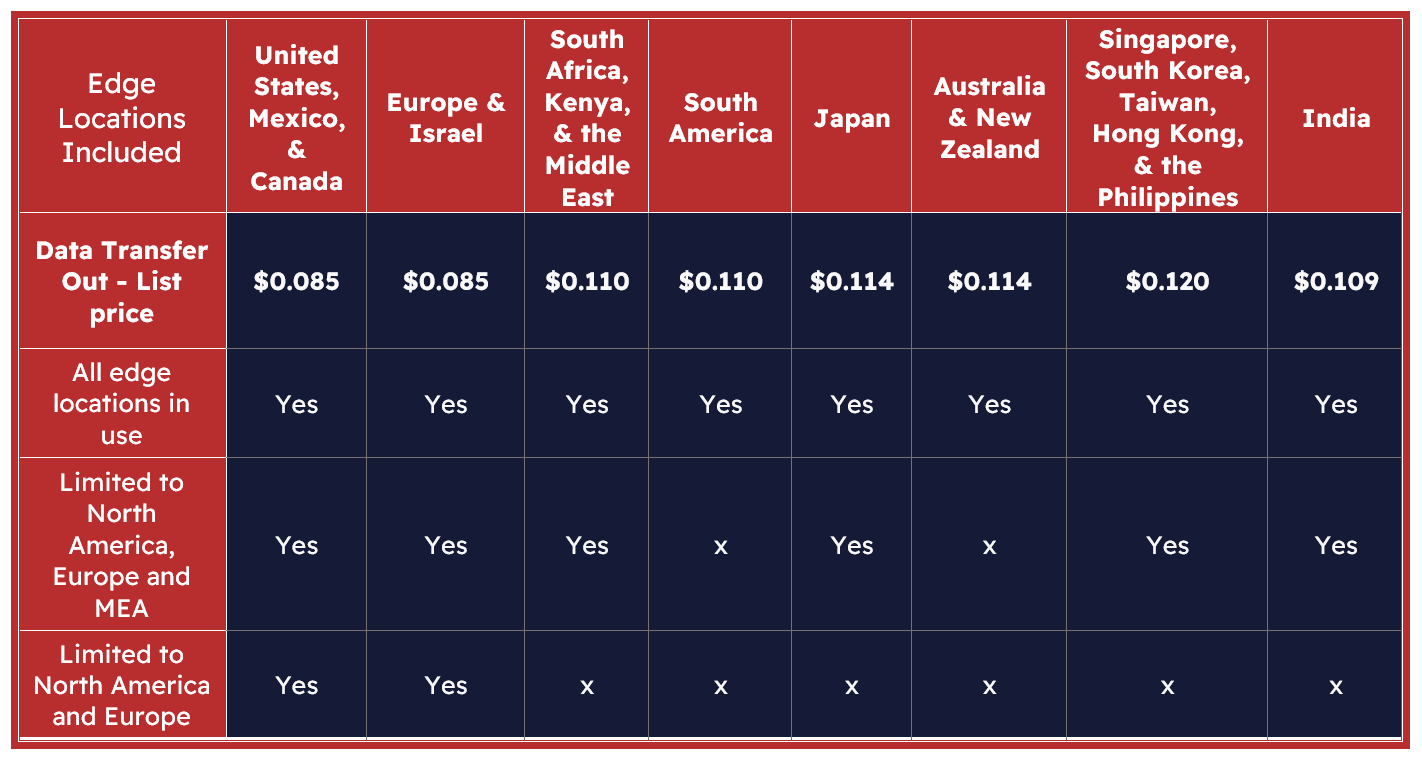
You can select the price class in the AWS Management Console when you are creating a new CloudFront distribution or you can change it in an already existing distribution.

3. Reserving capacity for CloudFront
AWS offers discounted pricing for customers willing to commit to a minimum of 10 TB of Data Transfer Out per month for a period of 12 months or longer. Discounts vary based on the level of commitment.
This Cloudfront price reduction is usually only suitable for those businesses that have a steady application or website traffic and therefore predictable usage in the long term. Businesses that have seasonality or peaks throughout the year should expect to always pay at least the equivalent of their minimum monthly commitment.
4. With Cache-control:
This should help you to use the browser cache of your users more to cut Amazon CloudFront costs, but it can also help with the load on your origin server. For files that should be distributed through CloudFront, you can set how much time they should be saved in edge locations and the user browser. Normally CloudFront serves a file from an edge location until the cache duration that you specified passes. It’s best to make sure your expiration time isn't too short (it should be days or weeks at least, and months, ideally). You should be aware that if you need to make frequent changes to these files, this function will not work for you very well. CloudFront forwards the request to the origin server to verify that the cache contains the latest version of the file only after the file expires and the next time the edge location gets a user request for the file. You can invalidate your files in CloudFront caches any time you need, but you will be charged for this.
In this case, you can minimize Amazon CloudFront costs for data transfer out on files that can be cached inside of your user's browser cache. When these files are saved there, the user browser doesn’t have to fetch them from the cache in the edge location and you don’t have to pay for data transfer out from AWS.
You can use the Cache-Control and Expires headers. If you are using services from different providers, you will probably find information about this in the documentation for your service. After you make changes to the metadata of your files, you will probably need to invalidate those files in CloudFront distribution settings.
There is a very simple way to add metadata to files inside the Amazon S3 bucket by setting meta tags for the files:
- Sign in to the AWS Management Console and from the Services menu open Amazon S3.
- Choose the S3 bucket that contains the files on which you need to change the expiration time (TTL).
- In the Name list, choose the name of the object that you want to add a header to.
- Scroll down to Metadata options and click on Edit.
- Choose Add Metadata.
- In the Key menu, choose Cache-Control or Expires.
- In the Value field, type one of the following:
- For a Cache-Control field, type: max-age=number of seconds that you want objects to stay in a CloudFront edge cache.

- For an Expires field, type a date and time in HTML format.
- Make sure your expiration time isn't too short (days or weeks at least; months ideally).
- After you add these metadata to your files, you will have to invalidate them in CloudFront distribution settings.
Possible cost reduction for those who use services from providers other than Amazon Web Services
Consider using Amazon Web Services instead of other services with CloudFront CDN:
If you are using CloudFront as a CDN distribution for other services from a provider other than AWS, you also pay your provider for data transferred from your origin to CloudFront CDN (Data Transfer Out). You can see a simple schema of data transfer costs below.
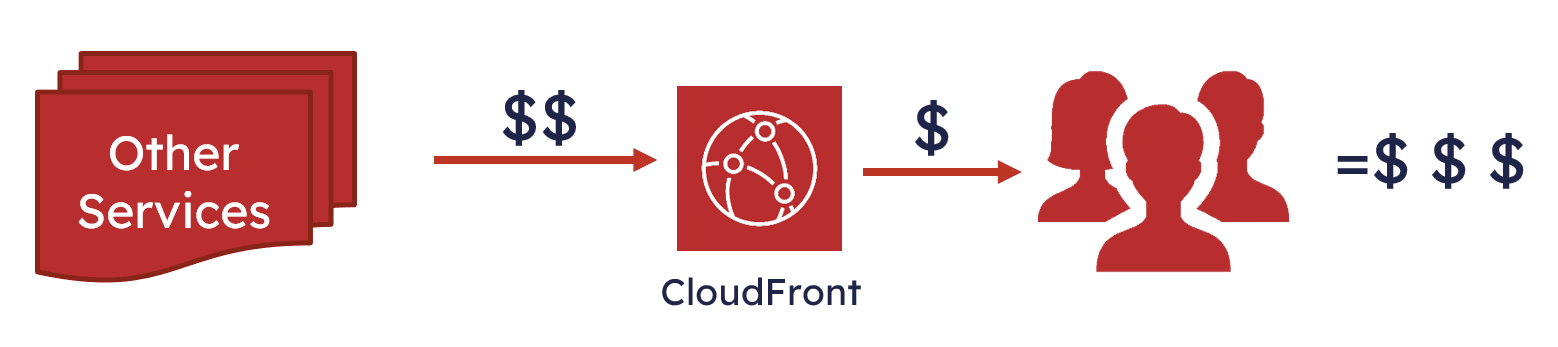
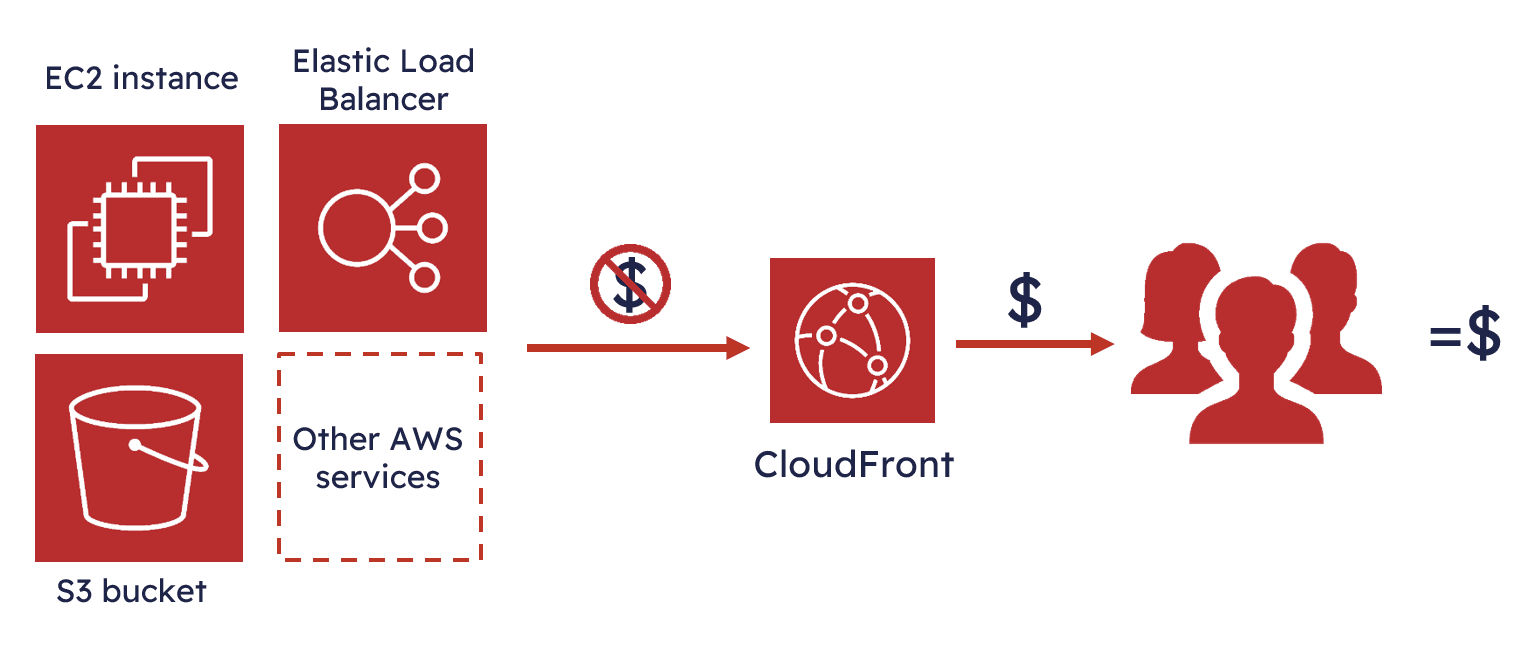
You should consider using AWS (Amazon Web Services) instead of services from different providers. If you use Amazon CloudFront, you don’t pay for data transfer out from Amazon services such as S3, EC2 and ELB, you just pay for data transfer from CloudFront to your users and other costs related to it. This is typically more cost-effective than paying for data transfer from regional services. An example of a simple schema can be found below.
Consider using CloudFront CDN instead of a CDN service from other providers:
If you are already using Amazon services such as EC2, ELB or S3, it’s best to also use CDN from Amazon. There are multiple reasons for this, but the main one is that you will no longer have to pay for data transfers between other CDN services and AWS. This solution is shown below.

You don’t pay for data transfers from AWS origins to a CloudFront edge location which can lead to significant cost savings. A simple solution with CloudFront CDN is below.
👉 Do you want to know more about how to optimize the Data Transfer Out of AWS and lower the cost associated with it? Watch our video.
Conclusion
By understanding CloudFront's pricing structure and implementing smart cost-saving techniques, such as choosing the right price classes, leveraging AWS origins, and fine-tuning cache-control settings, you can significantly reduce expenses. Utilizing Stormit’s expertise can further amplify these savings, ensuring you get the best value for your investment. Whether you're just starting with CloudFront or looking to refine your existing setup, these strategies will help you maximize performance while keeping costs in check.
FAQs
Yes. The AWS Free Tier includes 1 TB of data transfer out and 10 million HTTP/HTTPS requests per month at no charge. This allows you to test and run smaller workloads without cost.
Yes. By caching content closer to users, CloudFront can lower origin server bandwidth and compute costs. Using features like compression and cache policies further reduces expenses.
You can optimize costs by using the free tier, selecting the right price class, enabling caching and compression, and committing to data transfer discounts through AWS Savings Plans.

An AWS Solutions Architect with over 5 years of experience in designing, assessing, and optimizing AWS cloud architectures. At Stormit, he supports customers across the full cloud lifecycle — from pre-sales consulting and solution design to AWS funding programs such as AWS Activate, Proof of Concept (PoC), and the Migration Acceleration Program (MAP).