Google Cloud vs AWS Pricing Explained: What Actually Affects Your Cloud Costs?
Google Cloud vs AWS pricing is not about finding one universally cheaper provider. Your final cloud bill depends on workload design, compute usage, storage, databases, data transfer, managed services, discounts, credits, and support. This guide explains AWS vs GCP pricing in practical terms, shows where each provider can cost less, and helps you understand what to compare before making an infrastructure decision.
💡 For a more in depth comparison between AWS and Google Cloud, check out this article: AWS vs GCP: A Practical Comparison for Choosing the Right Cloud Platform.
Quick summary
- There is no universal cheaper provider. The right choice depends on workload, region, traffic, architecture, and discount strategy.
- Google Cloud can be cheaper for steady compute usage, analytics-heavy workloads, and eligible sustained use discounts.
- AWS can become more cost-effective with Savings Plans, Reserved Instances, AWS credits, and strong cost governance.
- Hidden costs often matter more than list prices. Data transfer, idle resources, logs, support, and poor architecture can change the final bill.
Why Comparing AWS and Google Cloud Pricing Is Difficult
Comparing Google Cloud vs AWS pricing looks simple until you estimate a real application. You are not only paying for compute. You are paying for a mix of cloud resources that interact with each other.
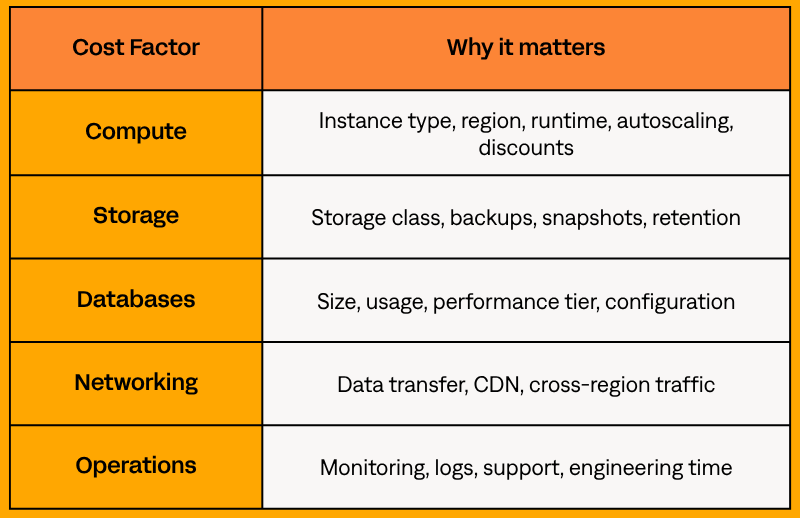
The better question is not only “is Google Cloud cheaper than AWS?” It is “which provider is cheaper for this workload, at this scale, with this architecture?”
Different Billing Models Create Misleading Comparisons
AWS and Google Cloud use different pricing and discount models, so a simple list-price comparison can be misleading.
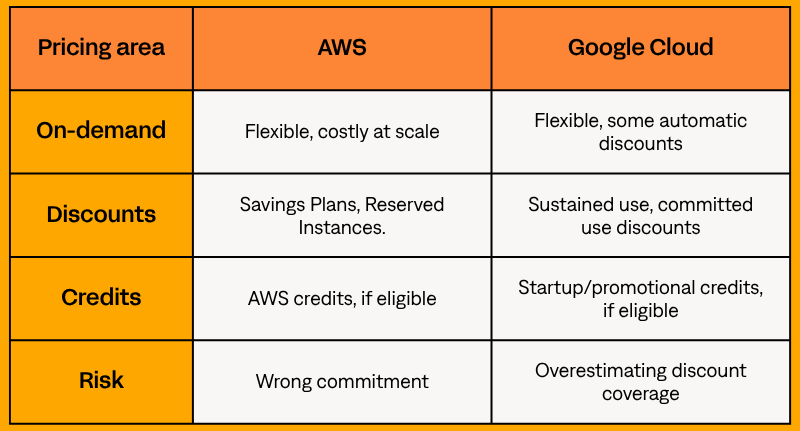
The real comparison is effective monthly cost, not list price. A workload may look cheaper on Google Cloud at first, while AWS may become cheaper after commitments or credits.
Why Architecture Often Matters More Than Provider Pricing
A poorly designed setup will be expensive on both AWS and Google Cloud. Common cost drivers include:
- oversized resources
- idle development and staging environments
- old backups and unused snapshots
- cross-region traffic
- excessive logging
- over-scaled databases
- lack of knowledge about the service-specific pricing
Architecture often has a bigger impact on cloud spend than the provider itself. For example, a SaaS app with oversized production resources, idle test environments, and no storage lifecycle rules may cost more because of design choices, not because AWS or Google Cloud is inherently expensive.
Compute Pricing: Is GCP Really Cheaper Than AWS?
Compute is usually the first category teams compare when looking at GCP vs AWS pricing. AWS uses Amazon EC2 for virtual machines. Google Cloud uses Google Compute Engine.
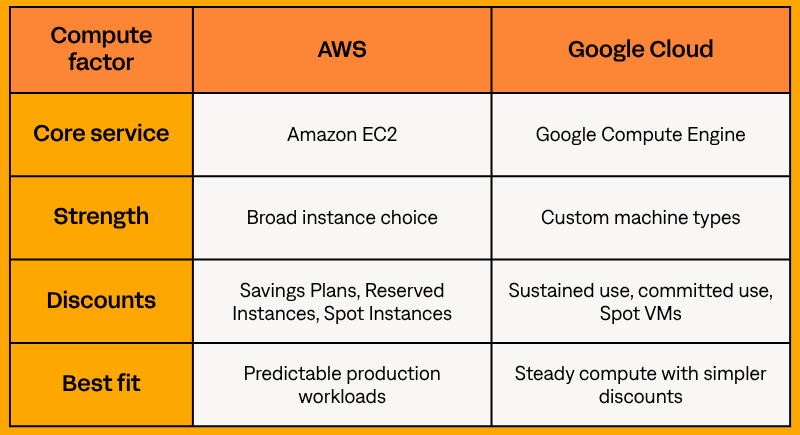
A fair comparison should include vCPU, memory, region, disk type, runtime, autoscaling, discount eligibility, and expected traffic.
EC2 vs Compute Engine Pricing
Amazon EC2 and Google Compute Engine both support general purpose, compute-heavy, memory-heavy, and accelerated workloads. Google Cloud also offers custom machine types for more specific CPU and memory needs.
Disks, networking, region, performance, and discounts can change the final cost, even when resources look similar on paper.
Where Google Cloud Usually Costs Less
Google Cloud can be cost-effective for steady Google Compute Engine usage, especially when sustained use discounts apply. It can also be a strong fit for analytics-heavy workloads where BigQuery is central to the architecture.
Google Cloud usually looks strongest when workloads are steady, analytics-driven, or eligible for automatic discounts. For example, a reporting platform that runs continuously and queries large datasets may benefit from both BigQuery and sustained compute usage.
Where AWS Can Become More Cost-Effective
AWS can become more cost-effective when teams use its discount options well. AWS Savings Plans and Reserved Instances can reduce costs for predictable workloads, especially when usage is stable enough to forecast.
💡For a more detailed comparison of these discount models, see our AWS Savings Plans vs Reserved Instances guide.
AWS credits can also make a big difference for startups. For example, an early SaaS company may keep costs lower during product development if credits cover part of its compute, database, and storage usage.
💡Learn more about AWS Startup Credits and how startups can access them.
Storage and Data Transfer Costs Compared
Storage and data transfer can quickly change the GCP vs AWS cost comparison, especially for growing products with high traffic or multi-region users.
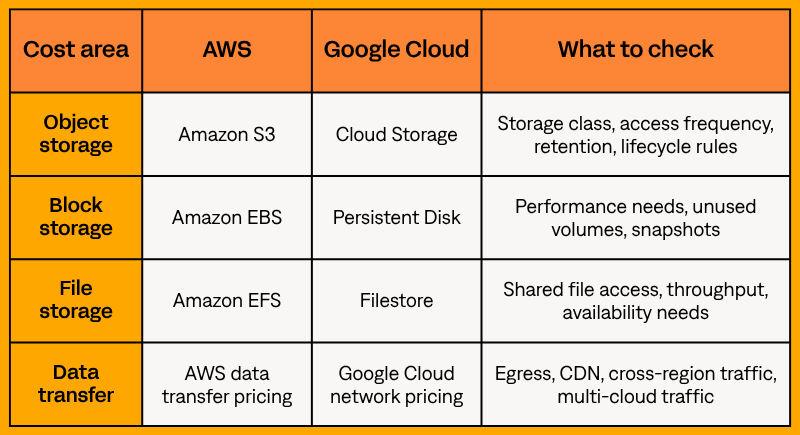
Both providers can reduce storage costs when data is placed in the right storage class. The risk is leaving rarely used data in expensive, high-access storage.
Data transfer is harder to predict. Costs can rise when data leaves the cloud, moves between regions, or serves high-volume traffic, especially for media-heavy apps with images, videos, or downloads.
AWS vs GCP Pricing for Different Workloads
The best way to compare AWS vs GCP pricing is by workload. The same provider can be cheaper for one system and more expensive for another.
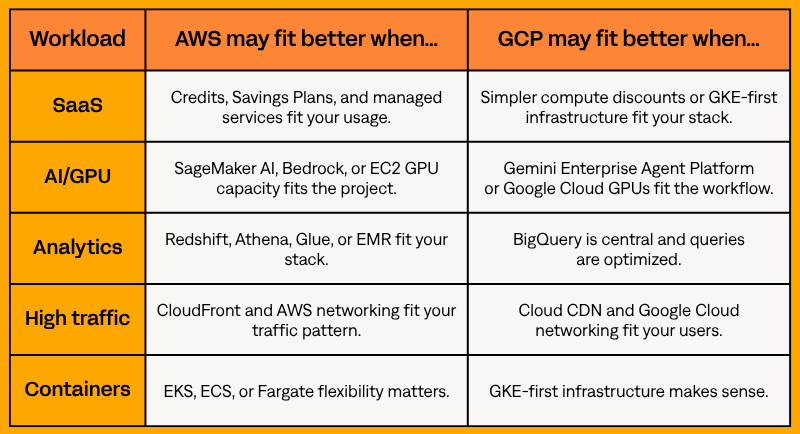
SaaS Applications
SaaS costs usually come from compute, databases, storage, monitoring, environments, and data transfer. Right-sizing and environment management often matter more than small provider price differences, especially when unused test environments keep running.
For example, shutting down unused test environments outside working hours can save more than switching clouds.
AI and GPU Workloads
AI and GPU costs depend on accelerator type, availability, region, storage, and workload duration. Do not compare only GPU hourly rates.
A cheaper GPU may not save money if capacity is limited in the right region or expensive instances sit idle between jobs.
Data Analytics Platforms
Google Cloud is often strong for analytics-heavy workloads, especially when BigQuery is central to the architecture. AWS also offers mature analytics services, including Amazon Redshift, Amazon Athena, AWS Glue, and Amazon EMR.
For analytics, the real question is not just “Is Google Cloud cheaper than AWS?”. It is how often you query the data, how much data you scan, and how well the data model is optimized.
High-Traffic Applications
For high-traffic applications, networking, caching, CDN configuration, load balancing, and regional design can dominate the final bill. A high-traffic application can become expensive on either provider if caching, data transfer, and regional architecture are not managed carefully.
Kubernetes and Containerized Workloads
For Kubernetes and containerized workloads, compare Amazon Elastic Kubernetes Service and Google Kubernetes Engine, but do not stop there. AWS also offers Amazon ECS and AWS Fargate, which are particularly well-suited for developers who don't want to manage Kubernetes environments and simply need to deploy microservices.
A badly utilized Kubernetes cluster wastes money on both AWS and Google Cloud. For example, nodes running at low utilization can keep billing even when containers are doing very little useful work.
Discount Models and Long-Term Pricing
Discounts can change the entire Google Cloud vs AWS pricing comparison. On-demand pricing is useful for testing, but production workloads usually need a long-term cost strategy.
AWS Savings Plans and Reserved Instances
AWS Savings Plans provide lower prices in exchange for a commitment to consistent usage over a one-year or three-year term. Reserved Instances can also reduce costs for predictable usage.
AWS discounts work best when the workload is predictable enough to forecast and actively managed over time. The risk is committing too early, committing to the wrong pattern, or keeping resources that no longer match the architecture.
AWS Credits and Cost Reduction Opportunities
AWS credits can strongly affect the real cost of AWS for startups, early-stage products, and teams experimenting with new infrastructure. They can help reduce spend while a team:
- builds an MVP
- tests a new workload
- migrates infrastructure
- validates scaling assumptions
Google Cloud Sustained Use Discounts
Google Cloud sustained use discounts reduce eligible Google Compute Engine costs when resources are used for more than 25% of a billing month and are not already receiving another discount.
Google Cloud sustained use discounts can simplify cost reduction, but they do not replace proper cost planning. Teams still need to check whether the workload is eligible and whether committed use discounts or architecture changes would create better savings.
Hidden Costs Most Teams Ignore
The most expensive cloud costs are often the ones teams do not model early enough.
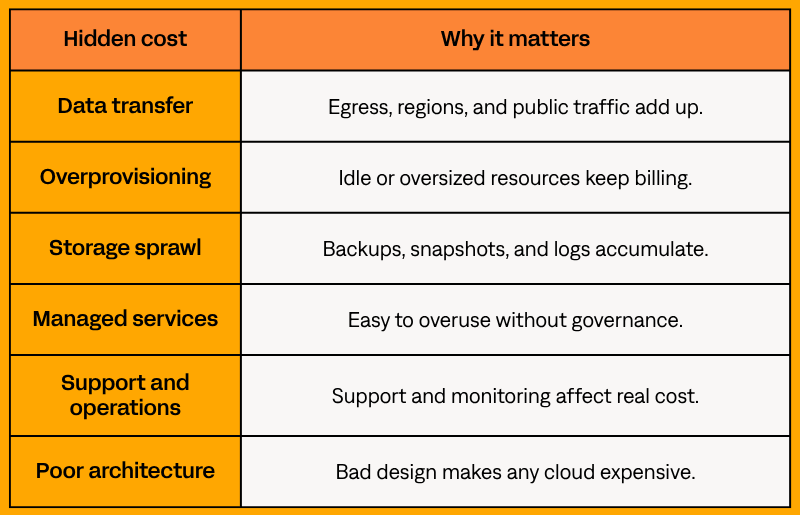
This is why a cloud cost audit or architecture review can be more useful than another pricing table. Many cloud cost issues come from architecture decisions rather than provider pricing alone.
Final Verdict: So… Is Google Cloud Cheaper Than AWS?
Sometimes. Google Cloud can cost less for steady compute usage, analytics-heavy workloads, and eligible sustained use discounts. AWS can cost less when teams use Savings Plans, Reserved Instances, AWS credits, and strong cost governance.
So the honest answer to “Is GCP cheaper than AWS?” is: it depends on your workload, usage pattern, discount model, and architecture.
The safest approach is to compare both providers using the same assumptions, then review the architecture behind the estimate. If your cloud bill is growing faster than expected, Stormit can help identify avoidable costs before they become a scaling problem.
FAQs
Sometimes. Google Cloud may cost less for steady compute and analytics-heavy workloads. AWS may cost less with Savings Plans, Reserved Instances, AWS credits, and strong cost optimization.
AWS relies more on commitment-based discounts, while Google Cloud offers automatic sustained use discounts for eligible Google Compute Engine usage.
You can contact a partner like us, and we can prepare a cost comparison for you. Alternatively, you can use the AWS Pricing Calculator and Google Cloud Pricing Calculator with the same assumptions: region, compute, storage, databases, data transfer, support, discounts, and expected growth. Then review the architecture for avoidable costs.

Experienced Cloud Engineer with expertise in designing, building, and overseeing cloud-based systems. Professionally certified in AWS, specializing in leveraging AWS services to create robust, scalable, and efficient infrastructure. The primary focus is on Amazon Elastic Kubernetes Service (EKS), with extensive knowledge in container orchestration and management.